Vendor Reconciliation: Process, Steps & Best Practices (2026 Guide)
TL;DR
- Vendor reconciliation tells you that what you owe your vendors exactly matches what they claim that you owe them. It is what helps you catch errors, duplicates, and missed credits in your statements.
- To perform vendor reconciliation you have to start with collecting vendor statements, matching them against your internal records, and finally resolving any discrepancies.
- Vendor reconciliation automation can make the process easier by removing the manual heavy-lifting that you normally would have to do. It usually offers multi-format ingestion, high-speed matching and exception routing.
"In God we trust; all others must bring data." That line, often attributed to W. Edwards Deming, was originally about quality management. However, it applies to vendor payments as well.
Every month, vendors send you statements telling you what they believe you owe them. Ideally, your internal accounts payable records should also match their claims. Sometimes they do not. Vendor reconciliation is what helps you identify this gap and resolve it through escalation. If done correctly, it makes your books cleaner and your vendor relationships stronger.
Here we shall take a closer look at everything you need to know about vendor reconciliation and how it works.
What Is Vendor Reconciliation?
Vendor reconciliation is the process of comparing your internal accounts payable records against statements received from your vendors. This process is done invoice by invoice and payment by payment to confirm that both sides agree on what has been billed and paid and what is outstanding.
In the enterprise context, this involves matching multiple invoices, partial payments, credit notes and sometimes multiple currencies. All of these need to be accounted for and documented.
With vendor reconciliation, the terminology can get a bit confusing as there are a few related terms that mean slightly different things:
Why Vendor Reconciliation Matters in Enterprise Environments
The bigger your vendor base is, the more transactions you're processing, and the more people touching purchase orders and invoices. This means more things can go wrong. Here’s what can actually be at risk:

1. Cash flow accuracy
If your payables records don't match reality, your cash flow projections won’t match either. This means that overdue amounts can get missed and outstanding credits aren't applied. At the end, you end up making decisions based on numbers that aren't quite right.
2. Duplicate payment risk
Duplicate invoices like invoices mentioning the same vendor, same amount and slightly different reference numbers, are one of the most common and costly AP errors. Without matching, these slip through and you end up paying twice.
3. Missed credits and discounts
Vendors very often may issue credit notes for any returned goods, billing errors, or agreed discounts. If you don’t track these and apply them during reconciliation, you're effectively leaving money on the table.
4. Fraud detection
Reconciliation is one of your clearest lines of defence against AP fraud, whether that's fictitious vendors, inflated invoices, or internal manipulation of payment records. Reconciliation flags these red flags before you bear any costs.
5. Audit defensibility
Auditors will ask whether your payables balance is accurate and whether there's evidence to support it. A clean vendor reconciliation trail with documented exceptions and approvals gives them exactly what they need.
6. Vendor relationship health
You run the risk of damaging long-standing vendor relationships if there are constant disputes over unpaid invoices or any unresolved discrepancies. When vendors trust you and value your relationship they are more likely to give you better terms.
Vendor Reconciliation Process: Step-by-Step
Here’s how the vendor reconciliation process works:
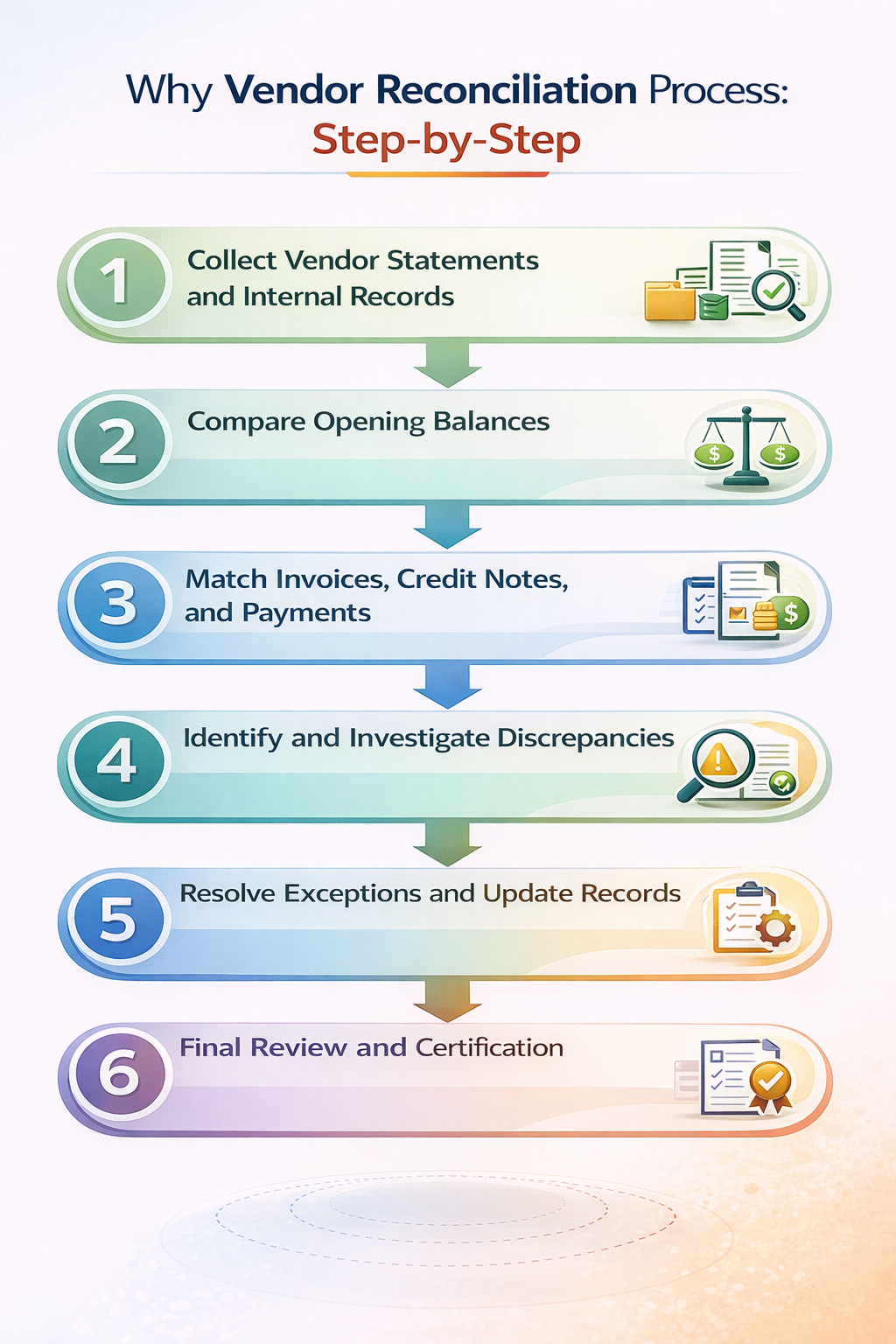
Now, let’s take a look at how vendor reconciliation works at every stage.
Step 1: Collect Vendor Statements and Internal Records
First, you’d start by gathering documents from the vendors and your side for comparison. From the vendor you’d need a document showing all invoices raised, payments received, and credits issued for the period. From your end, you need the corresponding extract from your AP ledger.
At this stage, the difficulty is in that vendor statements usually arrive in different formats and your ERPs may use different reference numbers, date conventions, or currency treatments. Getting both sides into a comparable format can be time-consuming.
Step 2: Compare Opening Balances
Before moving on to matching individual transactions, check that the opening balances agree. If your AP ledger shows a different opening balance than the vendor's statement does, that difference will carry through every subsequent comparison and make everything harder to reconcile.
Opening balance mismatches are usually caused by transactions from a prior period that were disputed, reversed, or recorded differently.
Step 3: Match Invoices, Credit Notes, and Payments
This is the most important step in the reconciliation process. Here you go through each item on the vendor statement and find the corresponding entry in your AP records. For each invoice, you have to answer these questions:
- Does the amount match?
- Does the date match?
- Has a payment been recorded against it, and does that payment match what the vendor shows as received?
Credit notes and adjustments need the same treatment. You also need to check payments carefully. Partial and split payments can add a layer of difficulty to your matching.
Step 4: Identify and Investigate Discrepancies
After you complete matching, any item that doesn't match fully is a discrepancy. Not all of them may be errors, some could be timing and some may be legitimate disputes. However, all of them need to be categorised and investigated following the same rules.
Step 5: Resolve Exceptions and Update Records
Resolution should depend on what the discrepancy actually is. You have to document every resolution with relevant evidence and then tie it back to the specific item it resolves. Proper documentation at this stage will help during audits later on.
Step 6: Final Review and Certification
Finally, you’ve matched all items and resolved any outliers and discrepancies, your reconciliation document has to be reviewed by an approver. This is to check that all exceptions have been properly explained and that all adjustments are fully supported. The reviewed documentation can then be certified by an auditor.
Vendor Reconciliation Example
Imagine your company purchases IT equipment from a vendor. At month-end, their statement shows three invoices, one credit note, and two payments. Your AP ledger shows something slightly different. Here’s what it looks like:
The vendor's statement shows a closing balance of $4,700. Your ledger shows $6,200. The difference is exactly the value of the credit note CN-210, which the vendor issued for a returned unit, but your AP team hasn't yet recorded.
To resolve this, you’d have to locate the credit note, confirm the return was processed, post the credit in the AP ledger, and re-run the reconciliation. Closing balance now agrees on both sides. The credit note, the evidence of the return, and the adjusting entry are all attached to the reconciliation record.
Common Challenges in Vendor Statement Reconciliation
In theory, the process we discussed above is pretty clean. However, in practice, here are some challenges you may come across:
1. High transaction volume: As transaction volumes increase, so do the number of invoices, payments and credit notes flowing through the system. Manual processes cannot keep pace as you scale up.
2. Multi-currency vendors: When a vendor invoices in a different currency to your ledger, exchange rate differences create apparent mismatches that aren't actually errors. These need to be identified, documented, and handled separately from genuine discrepancies.
3. Decentralized procurement: If your purchasing decisions happen across multiple departments, AP may not have full visibility into every commitment. This gap can make it harder to reconcile statements.
4. Manual Excel processes: Spreadsheet-based reconciliation works for small volumes. Once you’re dealing with large volumes, it can cause version conflicts and errors.
5. ERP data gaps: Poorly coded invoices, missing reference numbers, or inconsistent vendor naming across systems can make automated matching impossible and manual matching extremely time-consuming.
6. Lack of standardized statement formats: There's no universal format for a vendor statement. Each vendor has a different formatting, this can cause issues with reconciliation.
7. Exception backlog: Unresolved exceptions from previous periods carry forward and accumulate. After a few months, the backlog obscures what's genuinely new versus what's been sitting there unresolved for a quarter.
Measuring Vendor Reconciliation Performance
You cannot improve your reconciliation process if you don’t measure it. Here are some metrics to use:
How Automation Speeds Up Vendor Reconciliation
Manual vendor reconciliation is a time sink. While automation doesn’t eliminate the work entirely, it dramatically reduces the parts of it that don't require human judgement.
1. Data collection can be automated
Instead of manually downloading statements and converting formats, an automated system ingests data directly from source and also normalises it into a consistent format for matching.
2. Matching can happen in seconds
Rules-based matching engines compare your AP records against vendor statements at line-item level, flagging matches and exceptions automatically.
3. Exceptions are automatically routed
Rather than landing in a shared inbox and sitting there, flagged exceptions are automatically categorised, assigned to the right person, and tracked through to resolution.
Things to Do Before Automating Vendor Reconciliation
Automation makes a good process faster. It doesn't make a bad process better. Before you bring in any tooling, spend time getting the foundations right. Here’s what you need to do:
1. Standardise how vendors are set up in your system and clean your vendor master before you connect it to anything automated.
2. Define your reconciliation scope for each vendor to prevent coverage gaps and to prioritise where automation can add the most value.
3. Document your matching rules to make sure that it is applied correctly across your entire system.
4. Sort out your ERP data quality as automation can match only what it is given. Poor data fed to the automation platform will only lead to
How Enterprise Reconciliation Platforms Like Osfin Support Vendor Reconciliation at Scale
Vendor reconciliation involves exactly the kind of high-volume, multi-format, exception-heavy matching that reconciliation platforms are built for.
Osfin's reconciliation engine handles payments and financial data reconciliation. It can process up to 30 million records in 15 minutes with 100% accuracy. The capabilities it brings to those workflows are directly relevant to the matching, exception management, and audit trail challenges that make vendor reconciliation difficult at scale.
Here’s how:
- Osfin is a file-format agnostic platform that connects to 170+ data sources regardless of format. It applies custom deviation tolerances at ingestion to filter out poor quality data and any duplicates and outliers.
- The platform follows logic-based matching with rules configured by your team to handle many-to-one, one-to-many, and multi-way reconciliations including two-way, three-way, four-way, and five-way matches. It also auto-reconciles payment gateway reports with commission, tax, and fee breakdowns.
- Osfin’s exception handling engine automatically flags unmatched transactions with an accurate reason code and routes exceptions to the right team member through a built-in ticketing engine. You can track this in real-time with the live dashboard.
- Osfin also delivers a compliance report with complete traceability and full transaction history. Every part of your data is secured with 256-bit encryption, maker-checker flow, role-based access, and two-factor authentication. The platform is compliant with SOC 2, PCI DSS, ISO 27001, and GDPR.
If your team spends hours every month chasing vendor statement discrepancies, Osfin can help. From multi-format data ingestion to automated matching and exception routing, it's built to handle reconciliation at enterprise scale.
{{banner1}}
FAQs
1. What is vendor reconciliation?
Vendor reconciliation is the process of comparing your internal accounts payable records against statements from your vendors to confirm that both sides agree on what's been invoiced, paid, and still outstanding.
2. What is vendor statement reconciliation?
Vendor statement reconciliation refers specifically to the process of matching a statement issued by a vendor against your own AP records, line by line. It's a subset of the broader vendor reconciliation process.
3. How do you reconcile vendor statements?
To reconcile vendor statements you would need to first collect all vendor statements and your internal AP records for the same period. Then you’d compare open balances, match each invoice and payment and then flag any exceptions that you notice.
4. What is the difference between vendor reconciliation and accounts payable?
Vendor reconciliation is the process of aligning your records with a specific vendor's statement. On the other hand, accounts payable reconciliation involves verifying that your overall AP sub-ledger balances agree with the general ledger.
5. How does automation speed up vendor reconciliation?
Automation handles the time-consuming parts like ingesting and normalising data from multiple sources, applying matching rules across large transaction volumes in seconds and routing exceptions to the right person. It can also help you create audit reports quickly.
6. What is a vendor reconciliation statement format?
Vendor statements vary widely and there is no universal format. Most of the time they would include the vendor’s name, period, list of invoices with dates, amounts and reference numbers and opening and closing balances.
7. How often should vendor statements be reconciled?
This depends on the vendors. For high-value or high-volume vendors, where discrepancies have a huge impact, statements should be reconciled monthly. Others can be reconciled on a quarterly basis.
8. Can vendor reconciliation reduce duplicate payments?
Yes, vendor reconciliation is in fact one of the most reliable ways to catch duplicates. When you compare invoices against payments and match each transaction, duplicates and unmatched items can be easily identified.