10+ Best Invoice Processing Platforms (2026)
TL; DR
- Invoice processing platform handles invoices digitally, from capture to payment.
- It offers high accuracy, quickens approvals, and keeps financial data organized.
- Here, we cover some of the best invoice processing tools, what they offer, and how to choose the right one based on your business needs.
Managing invoices is quite essential when it comes to running any business. Every payment, vendor relationship, and financial record depends on how well this process works. When invoice volumes increase, manual handling becomes difficult to manage. It takes time, requires constant checks, and increases the chances of errors.
Invoice processing platform works to simplify this entire flow.
There are many tools available today in the market, and most offer similar basic features. Picking the one that’s right for you comes down to how well it works with your current setup and how easy it is for your team to use. Here, we provide a comprehensive list of automated invoice processing platforms and help you understand what to look for before making a decision.
What is an Invoice Processing Platform?
An invoice processing platform processes invoices digitally. It captures invoice data like the supplier's name, the total amount due, and the invoice due date. Then, it matches the captured data with any corresponding supporting documents, like a purchase order or receipt.
Once the data is matched, it is posted in the ERP system of the organization. If it is unmatched, however, it is sent for approval.
A designated approver (like a finance manager) then reviews the invoice, and either approves it for payment or rejects it and flags it for further investigation.
To do all this, the platform employs a number of technologies, like Optical Character Recognition (OCR), Robotic Process Automation (RPA), Electronic Data Interchange (EDI), Machine Learning (ML), and cloud computing.
Why Invoice Processing is Critical in 2026
There are a number of factors that make invoice processing a necessity, especially when businesses deal with high volumes on a daily basis, and the demand for accuracy is only growing higher. Invoice processing systems:
- Give you visibility: It gives you a real-time view of where every invoice stands. What's been paid, what's pending, and what's overdue, so you don’t ever need to guess about your cash flow.
- Guarantee accuracy: With automation of data capture and matching, it eliminates the risk of human error, as every figure, date, and supplier detail is exactly right before any payment goes out.
- Provide more control: You get to define approval workflows and spending thresholds. That way, no payment can go unnoticed without the right person signing off.
- Support strong vendor relationships: Since your vendors are paid accurately and on time, trust is built. Invoice processing makes that consistency effortless, so you can maintain relationships that matter to your business.
How We Evaluate Invoice Processing Platform
Before we dive into our list of platforms for invoice processing, you need to be mindful of some parameters that your chosen platform ought to have. It’s what we considered while curating this list. The factors based on which we evaluated these solutions include:
- How well does it leverage invoice automation capabilities?
- Is its integration with other business systems smooth?
- Does the platform offer customization when it comes to its dashboard and workflows?
- How strong are its security and data protection standards?
- Does it come with a user-friendly interface and clean workflows?
- Can the platform scale in accordance with your business?
Comparison Table
10+ Best Invoice Processing Platforms in 2026
Below is our carefully prepared list of some of the best automated invoice processing platforms in the market.
1. Xero
Xero is a cloud-based accounting tool that’s widely used by small businesses. It keeps everyday bookkeeping simple and helps teams stay on top of their finances without too much effort.
Key features:
- Automates data ingestion from multiple sources, including banks and e-commerce platforms.
- Adapts to user patterns for bookkeeping and simplifies it to a click-to-confirm operation that automatically inputs data.
- Facilitates faster payments with customizable online invoices with integrated "pay now" buttons.
- Syncs directly with banks and leading ERP systems for seamless reconciliation.
2. HighRadius
HighRadius is a financial close management platform built for large, multi-entity organizations. It uses agentic AI to sync GL, sub-ledger, and external systems. It's an ERP-agnostic platform that delivers actionable insights and financial excellence.
Key features:
- Uses pre-built AI to automate key close and reconciliation tasks.
- Reduces AP function through touchless invoice processing, compliance checks, and smart supplier communication.
- Analyses data to recommend data-driven decision making.
- Streamlines treasury payments, provides cash visibility, and forecasting that unlock liquidity potential.
3. Tipalti
Tipalti's cloud-based financial automation solution includes AP automation, global mass payments, vendor management, and procurement automation. It is designed to help small, medium, and large businesses streamline their finance and accounting tasks end-to-end.
Key features:
- Vendors can manage their own details and submit invoices through a self-serve portal.
- Handles compliance checks like OFAC/SDN screening and supports PO matching.
- Keeps a full record of actions for financial audit and compliance needs.
4. Stampli
Stampli is an AI-driven financial operations platform. It delivers end-to-end capabilities across payments, corporate cards, and accounts payable. It adapts to finance teams' workflows and embeds directly into ERP systems.
Key features:
- AI assistant Billy the Bot learns cost accounting roles and business processes to automate manual AP processes.
- Automatic 2-way and 3-way matching at the line level reduces exceptions and speeds up reviews.
- Embeds directly into existing ERP workflows without disrupting how finance teams already operate.
5. Rho
Rho is a financial platform that combines banking, expense management, accounts payable, and accounting sync in one place. It is built for mid-sized and larger businesses that want to reduce tool fragmentation and manage accounts payable within a unified finance platform.
Key features:
- Its standout "One Click AP" feature lets teams email invoices to a dedicated inbox where Rho automatically captures the data, validates it, routes it for approval, and schedules payments.
- Rho's OCR learns from corrections. When a team flags a misread amount or vendor name, the system flags similar patterns in future invoices, improving accuracy without manual rule-building.
- Supports multi-level approvals, multi-entity capabilities, and robust payment options including ACH, wires, checks, and Rho Cards.
6. Plooto
Plooto is a simple platform for managing payments and invoices, especially for small and mid-sized teams. It keeps things organized without adding too much complexity.
Key features:
- Uses OCR to capture invoice data and reduce manual entry.
- Tracks invoice status in real time and sends reminders when needed.
- Supports domestic and international payments with simple approval flows.
7. Sage Intacct
Sage Intacct is a cloud ERP that includes strong accounts payable automation. It works well for growing businesses that want everything connected in one system.
Key features:
- Extracts invoice details automatically and prepares them for review.
- Duplicate invoice detection prevents errors before they post, and automated coding and purchase order matching reduce manual intervention.
- Sage Copilot, a built-in AI assistant, helps run budget variance analysis on demand and can shorten close cycles by up to 70%.
8. Basware
Basware focuses on automating the entire invoice lifecycle. It’s designed for teams that want better visibility and control across accounts payable.
Key features:
- Uses AI trained on large invoice datasets to automate most invoices.
- Routes invoices for approval automatically based on workflows.
- Continuously improves data extraction from PDFs over time.
9. Medius
Medius understands, learns, and acts across invoice-to-pay so your team spends less time processing and more time controlling spend. It uses intelligent technology, including agentic AI, machine learning, and LLMs to manage the source-to-pay process.
Key features:
- Auto-fills invoice data using AI with high accuracy after minimal input.
- Supports three-way matching to catch discrepancies early.
- Provides reports and insights to track spending and cash flow.
10. BILL
BILL simplifies accounts payable and receivable for small and mid-sized businesses. It brings the entire workflow into one system, so teams don’t have to switch tools.
Key features:
- Breaks AP into simple steps: capture, approve, pay, and sync.
- Supports multiple payment methods in one place.
- Syncs with major accounting tools to keep records updated.
11. SAP Concur
SAP Concur is a cloud-based platform for travel, expense, and invoice management. It provides real-time visibility, ensuring policy compliance and enhancing financial controls.
Key features:
- Invoices can be submitted via email, hard copy, fax, or electronically, with data extracted by OCR platform and then validated before being assigned to the invoice owner within the system.
- Purchase order matching compares invoices to purchase orders and goods received, and instantly displays exceptions.
- A single-data reporting warehouse containing both expense and invoice spend enables actionable insights into the bottom line, with accrual reports automatically emailed to department heads.
12. Coupa
Coupa is a spend management platform that helps businesses streamline supply chain design and planning, accounts payable automation, treasury, and procure-to-pay processes. It is built for mid-market to large enterprises and is backed by deep AI capabilities embedded across the full procurement and finance lifecycle.
Key features:
- Extracts invoice data automatically and checks for duplicates or fraud.
- Ensures compliance with country-specific invoicing rules.
- Identifies and routes invoice exceptions for faster resolution.
{{banner1}}
Limitations of Invoice Processing Platforms

Invoice processing platform simplifies a great deal when it comes to handling invoices, from data capture to approvals and payments. The problem is that it’s not without limits.
1. Not always 100% accurate: Even the most advanced systems usually achieve only about 90% accuracy in processing for standard invoices. That remaining 10% still needs human attention, which means the platform alone isn't a complete solution.
2. Trouble with non-standard invoice formats: Multi-page invoices with detailed breakdowns, mixed currencies on international orders, and invoices with multiple tax rates per line item are all formats that can confuse the system and cause exceptions.
3. Duplicate detection isn't foolproof: Similar invoices arriving within minutes of each other, or partial duplicates where amounts differ slightly, can slip past the system undetected, risking double payments.
4. Inability to handle vendor disputes: Issues that come with a history or ongoing negotiations between a vendor and the organization are beyond the resolution limits of the platform. That requires human judgment and relationship context.
Invoice Processing vs Invoice Matching vs Reconciliation
Invoice processing is the entire journey of an invoice. From the moment it lands in your system to the moment it's paid and archived. It's the umbrella term that covers everything. It includes data capture, matching, approvals, payment, and reconciliation.
Invoice matching is a specific step within invoice processing. The system takes the captured invoice data and checks it against the purchase order and receipts to verify that it all matches.
Reconciliation occurs at the end, after payment has been made. Under this, internal financial records are compared against external statements like bank statements or vendor statements, to make sure everything is consistent and accounted for. It’s more like double-checking your work.
Where Osfin Fits in Invoice Processing Workflows
Osfin is a modern reconciliation platform known to simplify reconciliation of high-volume transactions with 100% accuracy at lightning speed. It steps in at the tail end of the invoice processing workflow, right after payment is made. Once the invoice has been processed, matched, approved, and paid, that's when Osfin gets to work.
It pulls in all your data first
Before any reconciliation can happen, Osfin ingests data from all the relevant sources. It doesn't matter what format your files are in, it’s completely file format agnostic. And with over 170+ integrations, it can pull data from multiple systems simultaneously without any friction.
But it doesn't just dump that data in raw. It applies custom deviation tolerances during ingestion to filter out poor-quality data before reconciliation even begins, and it automatically detects duplicates and outliers at the point of entry, so those issues don't snowball into bigger problems downstream.
Then it reconciles, intelligently
Once the data is in, Osfin runs logic-based matching across it. It can handle many-to-one and one-to-many transactions, as well as multi-way reconciliations, including two-way, three-way, four-way, and even five-way matching.
The scale is impressive too: it reconciles up to 30 million records in just 15 minutes. It also auto-reconciles payment gateway reports, complete with commission, tax, and fee breakdowns, which is a huge time-saver for finance teams dealing with complex payment structures.
Exceptions are smoothly handled
Inevitably, some transactions won't match. Osfin flags them and automatically assigns an accurate reason to each unmatched transaction, then routes it to the right team member through its built-in ticketing and exception handling engine.
Meanwhile, live dashboards give your team real-time visibility into match status, financial exposure, and exception queues, so nothing goes unnoticed.
Everything is audit-ready
After reconciliation, Osfin delivers a compliance report and maintains a fully audit-ready workflow with complete traceability and transaction history. On the security side, your data is protected with 256-bit encryption, maker-checker flows, role-based access, and two-factor authentication.
{{banner1.1}}
How to Choose the Right Invoice Processing Platform
Before you opt for any invoice processing solution, identify what challenges you’re facing and then prioritize features that address those challenges specifically. During your selection process of the best invoice processing platform, don’t compromise on the following features:
- Clean UI: It should be easy to use. Your team shouldn’t require extensive training or technical knowledge to process invoices.
- Effortless integration: Connection with your existing ERP, accounting systems, and payment platforms should be easy, without the need for heavy development work or technical resources.
- Scalability: It ought to handle smoothly growing invoice volumes in accordance with the expansion of your business, without any compromise on processing speed, accuracy, or overall system performance.
- Dedicated customer support: A responsive support team is a must if you want any technical issues or processing errors resolved quickly, so there is minimal disruption to your accounts payable operations.
- Strong security standards: The platform should protect sensitive financial and vendor data using encryption, role-based access controls, and compliance with recognized industry security standards.
The Future of Invoice Processing
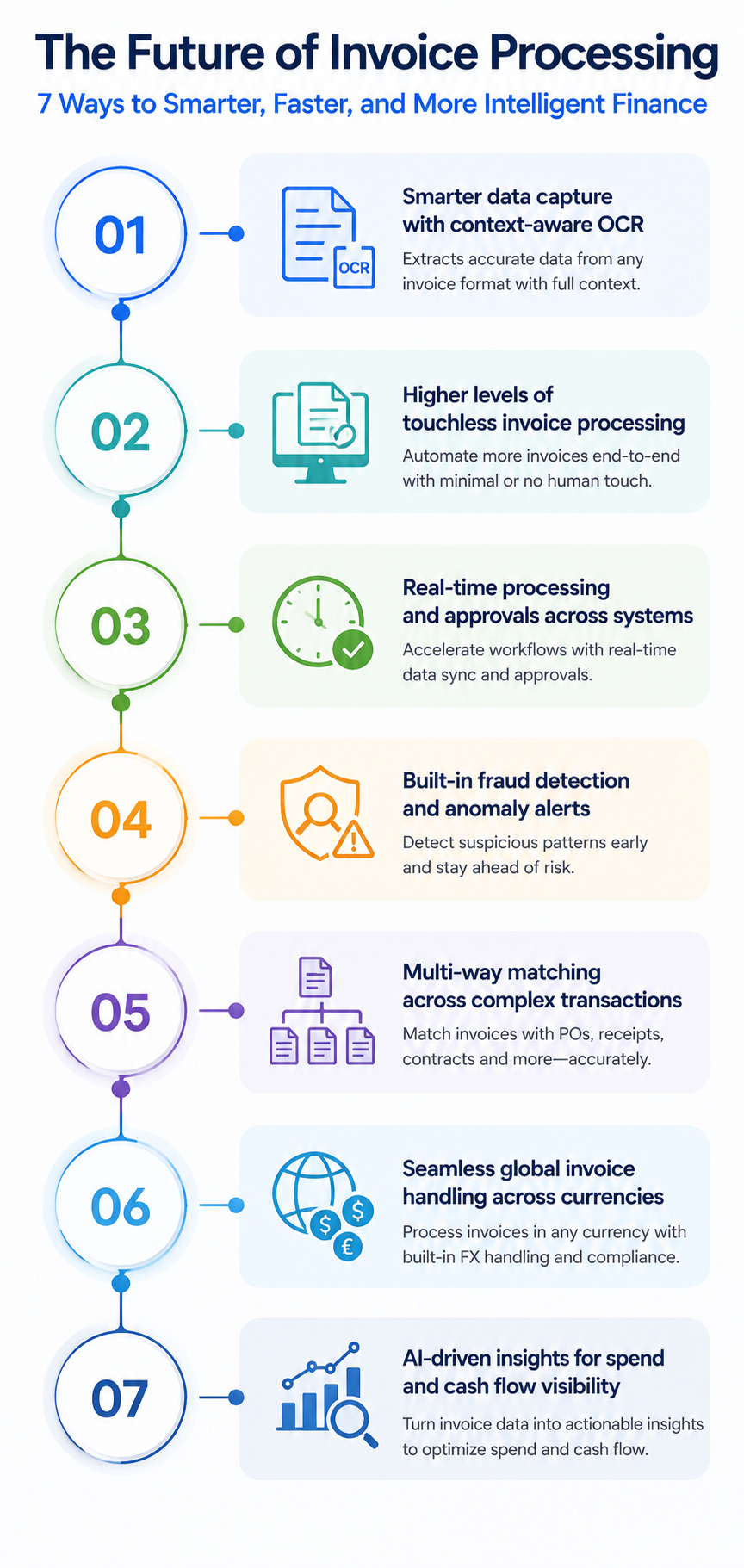
Invoice processing began with stacks of paper and manual data entry. Now, with automated workflows that can handle thousands of invoices in minutes, it has definitely come a long way. But the growth hasn’t stopped yet. If anything, it's accelerating. The way businesses process invoices in the next five years will look very different from what it does today.
1. Smarter data extraction: Invoice processing companies are adopting modern OCR technology, which is moving beyond simple text recognition toward context-aware data extraction. That means systems will understand not just what's written on an invoice, but what it means in the context of the transaction.
2. Touchless processing: Leading organizations are already achieving up to 90% touchless invoice processing, with human intervention reserved only for genuine exceptions, and that number is only expected to climb.
3. Sharper fraud detection: Smart algorithms are able to flag fraud risks and detect anomalies like duplicate invoices and unusual payments before they become a problem. That makes invoice processing a front line of financial security.
4. Multi-way matching: With supply chains growing more complex, simple two-way matching is giving way to three-way, four-way, and beyond. Systems can cross-reference more data points automatically to ensure payment accuracy.
5. Global invoice processing: Advanced platforms are breaking geographical barriers by supporting multiple languages and currencies. Businesses can process invoices from international suppliers without separate workflows or manual intervention.
Summing Up
With high volumes of invoices becoming the norm, manual processing is out of the equation. It's too slow, error-prone, and costly to sustain. Invoice processing platform is a necessity now.
But choosing the right invoice processing automation platform is equally important. You need to select wisely. Go for a clean interface, strong integration capabilities, reliable support, and high security standards.
And once the invoice is taken care of, reconciliation gets into the picture. It’s the final checkpoint that closes the loop on every transaction.
Purpose-built for the reconciliation stage of the workflow, Osfin takes over the moment payment goes out. For businesses that process invoices at scale and cannot afford discrepancies in their financial records, it brings the accuracy, speed, and traceability that the reconciliation stage demands.
{{banner2}}
FAQ
1. How does invoice processing platform work?
It starts by capturing data from invoices using technologies like OCR. The system then matches this data with purchase orders or receipts. If everything matches, the invoice moves forward for payment. If not, it is flagged for review.
2. What are the benefits of an invoice processing platform?
It reduces manual work, improves accuracy, speeds up approvals, and gives better visibility into invoice status. It also helps maintain proper records for audits and compliance.
3. Does invoice processing platform eliminate errors completely?
Invoice processing platform reduces errors significantly, but not entirely. Some invoices may still need manual review, especially if they are complex or don’t match existing records.
4. Where does reconciliation fit into invoice processing?
Reconciliation comes after payment. It ensures that your internal records match external statements like bank or vendor records, so everything is accurate and accounted for.