Invoice Automation Platform: Features, Benefits & Top Tools (2026)
TL;DR
Managing accounts payable manually is slow, error-prone, and pulls your team away from higher-value work. Invoice automation platform fixes that. It captures invoice data, matches it against your records, flags exceptions, and moves approvals through without the back-and-forth. Here, we break down 10 of the best invoice automation tools available, what to look for before you invest, and how Osfin steps in as a reconciliation platform.
Keeping track of Accounts Payable is an essential part of running a business. It helps you trace your cash flows and make informed spending decisions. The whole process of receiving invoices, matching them with your PO data, getting approval, and processing payments is long and tedious. It ends up consuming so much time and pulling teams away from higher-value work. It is also prone to errors that lead to financial losses for the business.
In this article, we introduce platforms for invoice automation to help ease your AP process. We evaluated various platforms and compiled a list of 10 that can reconcile your invoice data with your internal files, streamlining your approval and payment process.
We’ll also take a look at Osfin as a reconciliation platform adopted to enhance the capabilities of an invoice automation solution.
What is an Invoice Automation Platform?
Invoice automation platform is a tool designed to digitize the invoice processing. It reduces the burden of manually tracking and entering invoices. Invoice automation can be broken down into 3 steps:
- Ingesting Invoice data: Invoices sent by vendors in various formats like PDF, images, and XML files are captured and scanned for all relevant information, like Purchase Order (PO) number, taxes, total charges, etc., and inserted into relevant data files.
- Reconciliation: This data is reconciled with the existing internal financial records. Any discrepancies found are raised as exceptions and routed to the relevant authority for resolution.
- Approval: The matched invoices are sent to the approving authority for payment approval. Payments are executed once approval is received.
This 3-step journey is a long process when done manually, which reduces the efficiency of the business. Matching data for anomalies and obtaining approvals takes away time that can be allocated for finance management and other critical functions. However, businesses can benefit significantly by investing in tools for invoice processing that automate the entire workflow.
Benefits of Using Invoice Automation Platform
Manually processing invoices consumes time and resources. Even then, it ends up having errors that cause losses to the business. Incorporating invoice automation tools into your accounts payable management offers many benefits. Some of these are:
1. Faster invoice processing: Manual invoice processing takes days to enter data, validate it against purchase orders, and obtain approvals for payment. Platform for invoice automation speeds up the process and saves time.
2. Reduced errors: Invoice processing has many steps and involves many people. Miscalculations, process errors, and losing the invoice are common occurrences when it is done manually. Automation uses advanced tools that help avoid all these errors.
3. Timely payments: Delayed vendor payments can strain relationships and cause you to miss out on early payment discounts. With the invoice automation tool, you can quickly send payment approval requests to the designated authority for processing.
4. Improved finances: Automating invoice processing not only saves you time but also reduces labor costs. It frees up time for your AP team to plan for better cash flow management and focus on higher-value financial functions.
How We Evaluated the Best Invoice Automation Platform
Choosing the best invoice automation platform comes with its own set of problems. You would not want to invest in a tool that doesn’t align with your business's requirements. Which is why, during our evaluation of invoice automation tools, we kept your business needs in mind. The questions we asked before deciding are:
- Does the platform for invoice automation reduce the workload of manual entry?
- Can it easily pick out the outliers in the data?
- Can it integrate with your existing system?
- Is its UI easy to navigate?
- Is it scalable across different business sizes?
Key Features to Look for in Invoice Automation Tools
There are many platforms for invoice automation. It is of utmost importance that the one you invest in tackles all your pain points. To help you with this, we have compiled a list of key features you can’t compromise on in invoice automation platform. These include:
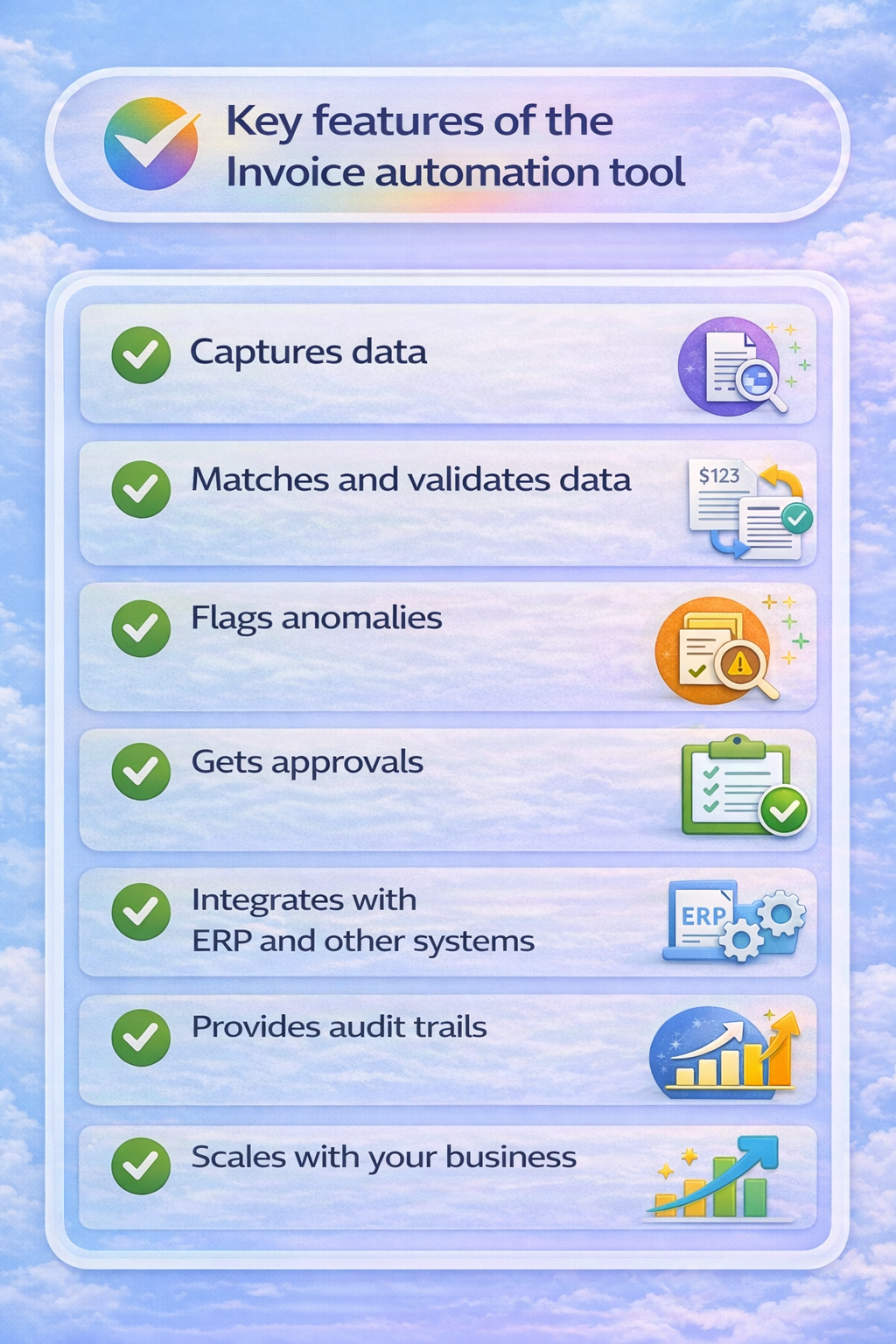
1. Captures data: Businesses deal with not one but many vendors, each with their own invoice format. An efficient tool for invoice automation should be able to ingest all these formats, such as images, PDF, XML, and extract essential details like invoice number, total charges, taxes, etc. Thereby reducing time wasted on manual data entry.
2. Matches and validates data: Everything should be matched against the rules set by your organization. A good invoice automation tool should be able to perform one-to-many and many-to-one reconciliations, like 2-way, 3-way, and 4-way, and validate them.
3. Flags anomalies: Anomalies are part of invoice processing and cannot be ignored, as they may indicate fraudulent activity or billing errors. The invoice platform should automatically route them to the respective authority for review and resolution.
4. Automates approval workflows: Once all information is validated, the personnel responsible for approving payments should automatically receive system-generated requests to authorize payments through the platform.
5. Integrates with ERP and other systems: A seamless invoice automation requires that your platform integrates with your ERP system. This helps centralize your business process and make strategic financial decisions.
6. Audit trail and compliance: Every action taken on an invoice should be automatically logged and traceable. This ensures that your business is always prepared for audits and meets regulatory compliance requirements without scrambling for records at the last moment.
{{banner1}}
Comparison table - Invoice Automation Platform
Top 10 Best Platform for Invoice Automation
To help make your journey easier, here is a list of the top invoice automation platforms to consider.
1. Tungsten
Tungsten is an AI-powered automation platform that automates AP and AR functions. It digitizes invoice processing and seamlessly integrates with many ERP systems.
Key features:
- Can ingest different file formats like PDF, XML, and EDI
- Automatically extracts data using ML and OCR
- Easily integrates with different ERP systems
Limitations:
- Not suitable for small businesses, as it is made for large enterprise environments
- High initial subscription cost
- Lacks an intuitive UI
2. Rho
Rho is a financial platform designed for business banking. They offer seamless payment reconciliation with their “one-click AP”.
Key features
- No platform fee
- Intelligent data capture feature extracts payment and line item data from invoices.
- Multiple methods of payment can be scheduled in a batch
- Flags duplicate invoices before making payments
Limitations
- Lacks a deep level of integration
- Time-consuming when clearing physical checks
- The user interface has limited customization
3. Infrrd
Infrrd uses a machine learning model to process invoices. Its AI is trained on multiple invoice formats, making information extraction seamless.
Key Features
- Intelligent Document Processing adapts and extracts data from multiple formats of invoices
- Exceptionally handle anomalies with the “human-in-loop” feature
- Supports 3-way and 4-way matching
Limitations
- AI still requires more data exposure to increase accuracy
- Not suitable for smaller, low-volume businesses
4. Coupa
Coupa is a cloud-based platform with AI-driven accounts payable processing. Its “Compliance-as-a-service” feature handles e-invoicing mandates and global tax regulation across 50+ countries.
Key features
- Reduces manual entry with AI-driven invoice handling that appropriately records them
- Allows users to pay invoices directly through the platform
- Flags potential fraud or duplicate invoices before making payment
Limitations
- Dip in performance when handling high volumes of data
- Limited customizations for businesses with complex needs
- The complex user interface makes it difficult to adapt
5. Vroozi
Vroozi is a cloud-based platform that uses AI to capture invoices and optimize spend management. It can easily handle PO and non-PO invoices.
Key Features
- AI-powered OCR can scan and capture line items from different formats of invoices
- Can perform 2-way or 3-way validation
- Automatically directs invoice approval to the correct personnel
Limitations
- Limited customization options for workflows
- Difficulty integrating with various ERP systems
- AI is not strong enough to handle complex data
6. Tipalti
Tipalti is a highly rated cloud-based platform, typically used by mid- sized or scaling businesses. It handles a high volume of international payments and automates the whole AP process.
Key Features
- Machine learning and OCR automatically scan various formats of invoices
- Has a global payment infrastructure supporting many payment methods across 200+ countries
- Allows suppliers to onboard themselves and track payment status
Limitations
- Has a long implementation time
- Faces syncing issues with some ERPs
- Occasionally faces issues with processing payments
7. Bottomline
Bottomline’s Invoice automation system is built to streamline the Accounts payable process. It integrates AI to detect fraud and ingest invoices.
Key features
- Payment-X network avoids fraud by detecting anomalies in invoices
- Has a strong 3-way validation system
- Allows invoice approvals on mobile by directing them to designated personnel
Limitations
- Has trouble ingesting some formats of invoices
- Requires significant time to integrate with some ERP systems
- Navigation can be inconsistent across modules
8. Docsumo
Docsumo is an intelligent document processing solution commonly used in industries with high volumes of data. It is famous for significantly reducing manual data entry with automated workflows.
Key Features
- Easily integrates with existing ERPs
- Uses IDP technology to extract data from invoices and validate it
Limitations
- OCR is incapable of processing complex invoice formats
- Demands higher technical expertise from the user for certain functions
9. Basware
Basware is a cloud-based invoice automation tool for accounts payable. It provides spend analysis and invoice tracking on your dashboards.
Key features
- Can capture invoices in all formats and channels, including paper
- Complies with the invoice mandates of over 50 countries
- Smoothly integrates with any ERP system
Limitations
- Not suitable for small or medium enterprises from the price point and transaction complexity
- Invoices get stuck in queues with no error and require manual handling
- Delayed customer support from the Basware team
10. MineralTree
MineraTree automates the process of the accounts payable cycle. It uses AI-driven features to capture invoices and streamline approval workflow.
Key features
- AI-powered ORC technology that captures different formats of invoices
- Automatically routes approvals according to set rules
- Protects against fraud using two-factor authentication and human-in-the-loop validation
Limitations
- Applying credit memos from the vendor is not intuitive
- Does not accommodate niche approval scenarios
- Slow transit time and sync errors delay payments
How to Choose an Invoice Automation Tool
Invoice automation platform is only effective when it can tackle your business problems while staying within your price range. So when you are deciding on your tool for invoice automation, keeping the following things in mind would ease your load.
- The first problem in Accounts Payable management is manually entering data from different invoices. Your tool should be able to ingest all of them without requiring your team to pre-process or standardize anything.
- The platform should include technology to automatically process matches and surface only the exceptions that genuinely need human attention.
- All businesses utilize different ERPs. You should invest only in platform that integrates easily with your ERPs and streamlines your business processes.
- The complexity of any platform’s UI is a determinant in its usage, and so is true for invoice automation platforms. It should be easy to navigate and adapt without extensive training or IT support.
- Lastly, there is no point in getting an invoice automation platform that is not suitable for your business size. Make sure the tool you choose can handle your current invoice volumes and scale with you as those volumes increase.
How Osfin Enhances Automation
Invoice automation tools solve a specific problem: they capture invoices, match them against purchase orders, and move them through an approval workflow. For most AP teams, that's exactly what they need.
But not every finance team's problem starts and ends with invoices.
Banks process millions of transactions a day. Fintechs reconcile payment gateway reports across multiple currencies and fee structures. Insurance companies match claims against payouts at scale. For such financial institutions, the volume, complexity, and speed of financial operations go well beyond what any invoice automation tool is designed to handle.
At that level, what matters more is if every transaction, across every source and system, actually matches. Essentially, that's a reconciliation problem. And it needs a reconciliation platform like Osfin.
Osfin is purpose-built to cater to such business requirements with speed, accuracy, and efficiency. Here’s how it does that:
- Versatile ingestion capacity: Osfin, as a file-format-agnostic platform, can import data from multiple sources in various formats and connect to 170+ integrations. It also applies custom deviation tolerances to filter out poor-quality data before reconciliation begins, and catches duplicates and outliers at the point of ingestion, preventing downstream issues.
- Speedy reconciliation process: Osfin's logic-based matching engine handles one-to-many, many-to-one, and multi-way reconciliations, from two-way to five-way. It auto-reconciles payment gateway reports with commission, tax, and fee breakdowns, and processes up to 30 million records in 15 minutes with 100% accuracy.
- Superior exception handling: Osfin’s exception-handling engine automatically flags anomalies, assigns them a valid reason, and routes them to the appropriate person. It also offers real-time dashboards that show match status, exposure, and exception queues, so nothing is left unresolved.
- Audit-ready output: Every transaction is fully traceable, with complete history and compliance reports maintained automatically. It ensures the utmost level of security via 256-bit encryption, maker-checker flows, role-based access, and two-factor authentication. And complies with SOC 2, PCI DSS, ISO 27001, and GDPR.
{{banner1.1}}
Trends in Invoice Automation Platform for 2026
The key trends that are shaping the future of Invoice automation platform are:
Use of AI-driven OCR
Expanding business deals with an increased number of vendors. The invoices generated by these vendors would differ to meet their business needs. To capture all relevant details, it is natural to use a more advanced AI-driven OCR that can accurately scan invoices in various formats.
Multi-channel matching
Two-way matching, invoice against PO, used to be the standard. Business needs keep changing, and so do the rules. But as supply chains get more complex and compliance requirements tighten, businesses are moving toward three-way and four-way matching that brings in goods receipts, inspection records, and contract terms.
Fraud detectors
Frauds are becoming common these days and can cause significant losses to businesses. There are increasing instances of duplicate invoices, inflated line items, or payments to ghost vendors. The expectation from invoice automation tools is to come with a built-in fraud detection that catches anomalies before a payment goes out, and routes suspicious invoices to the right person for review before any damage is done.
Final Thoughts
As your business scales, you cannot continue to use tools from the past to manage your accounts. They are erroneous and consume your resources unnecessarily. To increase your accounts team’s efficiency and accuracy, consider invoice automation platform to reduce variable costs.
You can do so by reviewing all your business requirements and choosing an invoice automation tool that best suits you.
And if you're reconciling millions of transactions across banks, payment gateways, and internal systems every day, you need a solution like Osfin to streamline your workflows.
{{banner3}}
FAQs
1. What is invoice automation platform?
Invoice automation platform is a tool designed to streamline your Accounts Payable cycle by automating invoice data entry, validation, and approval.
2. What are the benefits of implementing an invoice automation tool in a business?
An invoice automation tool speeds up processing invoices and reduces errors. It saves you time and increases your workforce’s productivity.
3. How do I find the invoice automation platform best suited for my business needs?
When you look for an invoice automation tool, it is important that you keep your business’s size and needs in mind. The platform should reduce your manual data entry and automatically reconcile your external data with internal accounts.
4. What are the key features of invoice automation platform?
Invoice automation platform can capture data, match and validate it, flag anomalies, get approvals and integrate with ERPs and other business systems.