MT940 File Format Viewer & Spec
Key notes:
- MT940 is a standard for bank statements. The information they carry include transaction, balance and account movement for the day.
- Every tag in the MT940 file format comes with a particular purpose, like the Tag 61 carries transaction-level detail, and Tag 86 has the remittance and reference information that makes matching possible.
- Banks have different approaches to implement the MT940 spec, particularly in Tag 86, which makes parsing inconsistent across multiple banking relationships.
- MT942 serves intraday monitoring, while MT940 is the final end-of-day statement used for reconciliation and cash positioning.
- Banks and other financial institutions are moving from MT940 to camt.053 under ISO 20022.
For treasury teams and finance operations at banks and financial institutions, the end-of-day MT940 file is where reconciliation starts. It's the SWIFT standard for electronic bank statements, a structured record of every transaction, balance, and account movement for the day.
MT940 is what makes automated reconciliation possible across borders, currencies, and banking relationships. But the format is only as useful as your ability to work with it. At scale, the inconsistencies in how banks implement it create real processing challenges.
In this article, we dissect how exactly MT940 is structured, what each tag carries, how to parse it, where it breaks down, and how modern reconciliation platforms handle it end to end.
What is MT940?
MT940, or Message Type 940, is a messaging format banks use to send end-of-day account statements to corporate customers or their financial institutions.
It’s basically an electronic summary of everything that has moved through an account during the day. So, it will have every debit, credit, and the opening and closing balances.
SWIFT introduced this messaging standard to give banks a common language for sharing financial data across borders.
Before the MT940 file format, every bank had its own file format, which made it quite challenging for businesses managing accounts across multiple institutions. MT940 solved that by making the structure consistent, no matter which bank or country the statement came from.
MT940 File Structure
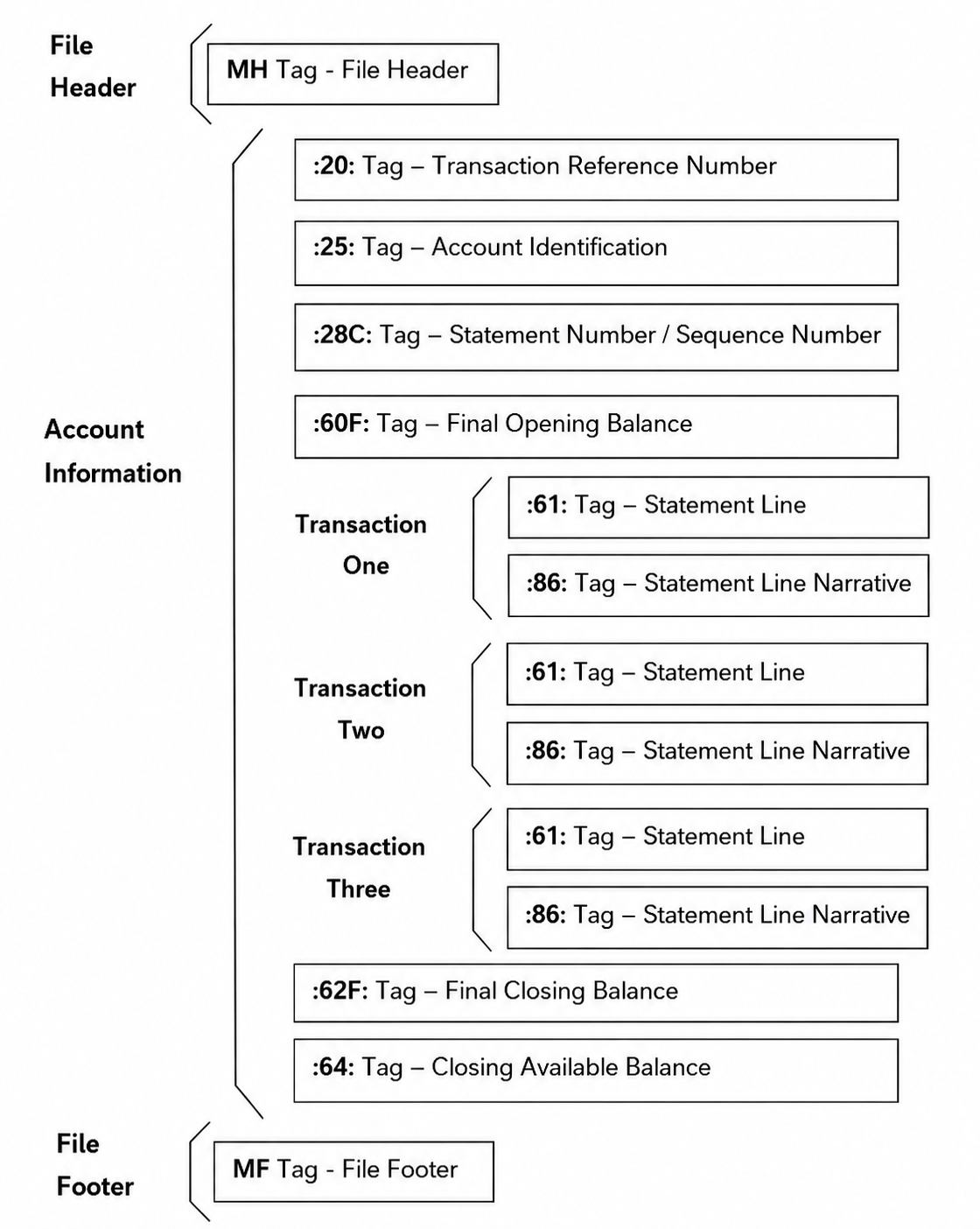
Three sections form the core of an MT940 file format: Header, Body (Text Block), and Trailer. Each block has a specific role, and the actual transaction data details go in the Body.
Header
The header contains details that help with the identification of the message and the parties involved. These usually mean the sender and receiver details, message type (940), and a unique message reference number. This offers information about the kind of message and from where it’s coming.
Body (Text Block)
This is where all the actionable data is. The Body contains a sequence of tags, each carrying a specific piece of information.
Trailer
The trailer closes the message. It carries authentication and checksum data that confirms the message hasn't been altered in transit.
MT940 Tag/Field Reference
Whatever data is present in the MT940 file is carried by a tag. These can be:
Tag 20: Transaction Reference Number
A unique ID the sender assigns to the message. Essential for tracking and avoiding duplicates.
Tag 25: Account Identification
The account number the statement belongs to, usually an IBAN or local account number.
Tag 28C: Statement/Sequence Number
Tracks how many statements have been sent for that account. If a day's data spans multiple messages, the sequence number keeps them in order.
Tag 61: Statement Line
The core of the file. Each transaction gets its own Tag 61 entry, carrying the value date, entry date, debit/credit indicator, amount, and transaction type.
Tag 86: Information to Account Owner
Optional, but critical for reconciliation. This tag holds narrative details like payment references, invoice numbers, or remittance information.
Tag 60F/60M: Opening Balance
The balance at the start of the statement period. 60F is the final opening balance; 60M is used for intermediate statements.
Tag 62F/62M: Closing Balance
The final end-of-day balance. 62F is definitive; 62M appears in intermediate statements.
Have a look at this table to further understand what these tags are all about.
*Tag 61 is optional at the format level but will be present in any statement that has transactions
Sample MT940 File
Here is a file MT940 example to give you an idea about how one looks in real life:
How to Read & Parse an MT940 File
MT940 files can be dense sometimes. So, reading them without proper context can be tough. So, here's what you can do:
1. Pick out the three main blocks first, which are Header, Body, and Trailer.
2. Before looking at any transactions, confirm the opening balance. This should match the previous day's closing balance.
3. Each Tag 61 line is one transaction. Read them in sequence:
- Check the D/C mark first. Is it a debit or credit?
- Note the value date. These two can differ, and value date is what matters for cash positioning.
- Capture the amount and transaction type code.
- Record the reference fields. You'll need these to match against internal records.
4. For each Tag 61 entry, check the Tag 86 that follows it. This is where you’ll find invoice references, sender details, and remittance information. Be aware that the format varies by bank. Some use structured codes like /OCMT/ or /CHGS/; others use free text. Build your parser to handle both.
5. Once all transactions are processed, verify that the closing balance matches:
Opening Balance ± sum of all Tag 61 transactions = Closing Balance.
If the numbers don't reconcile, recheck for missing entries or parsing errors in the amount fields.
6. Tag 28C carries the sequence number for this reason. Always process messages in sequence order before running reconciliation, otherwise balances will not add up.
MT940 vs MT942
MT942 is also a customer statement message and has a similar structure to MT940. Where they differ is in timing and completeness.
MT940 is the final end-of-day statement. It covers all transactions booked to an account during the day and includes a definitive closing balance. It's what treasury and finance teams use for reconciliation.
MT942 is the intraday version. Banks send it during the day, sometimes multiple times, to report transactions since the last update.
MT940 vs CAMT.053
MT940 has been the backbone of bank statement reporting for decades. But with the introduction of ISO 20022 standard, camt.053, the XML-based equivalent of MT940, came into the picture.
The difference here is in the structure.
MT940 is a flat text file with fixed-length fields and rigid tag formatting.
camt.053, on the other hand, is XML. That means fields are labelled, data is nested logically, and there's no practical limit on the information a message can carry.
Common MT940 Parsing Challenges
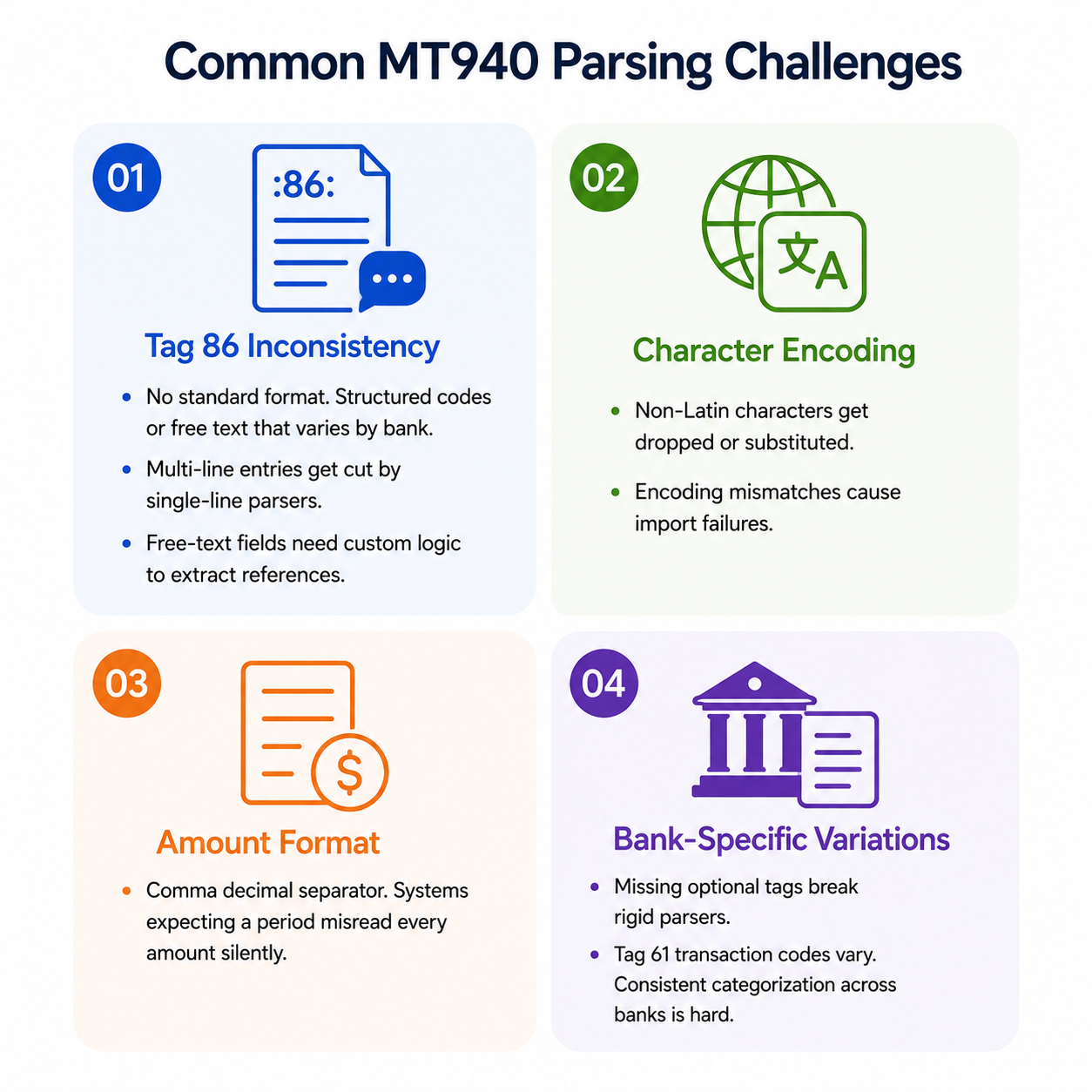
Every bank receives the same MT940 specification. In practice, though, different banks interpret the spec slightly differently. That means parsing often breaks down. The following are some common challenges:
Tag 86 Inconsistency
- Different banks format Tag 86 differently. Some use structured codes like /OCMT/ or /CHGS/. Others dump free text.
- Multi-line Tag 86 entries (up to 6 lines) often get cut or misread by parsers that expect a single line.
- Invoice references and remittance details buried in free-text Tag 86 fields can't be extracted reliably without custom logic per bank.
Character Encoding Issues
- MT940 uses a restricted SWIFT character set. Non-Latin characters, common in cross-border transactions, often get substituted or dropped entirely.
- Mismatched encoding between the sending bank and the receiving system causes import failures or garbled data in narrative fields.
Amount Format
- MT940 uses a comma as the decimal separator, not a period. Systems expecting standard decimal formatting will misread amounts entirely, a silent error that causes serious reconciliation mismatches.
Bank-Specific Variations
- Some banks include optional tags like :64: and :65: and others might skip them. Parsers built around a rigid template break when these tags are absent or appear out of expected order.
- Transaction type codes in Tag 61 vary by bank, making it hard to categorise transactions consistently across multiple banking relationships.
{{banner1}}
MT940 Reconciliation Use Cases
MT940 is what makes automated financial operations at scale actually work. That’s why it’s used in many banking operations, such as:
Bank Reconciliation
- Finance teams match MT940 transaction entries against internal ledger records to confirm every debit and credit is accounted for.
- Without a standardized format, teams managing accounts across multiple banks would be reconciling different file formats daily, a slow, error-prone process.
Treasury & Cash Positioning
- Treasury teams pull end-of-day MT940 statements into their TMS to get a consolidated view of cash across all accounts and currencies.
- The closing balance in Tag 62F gives a definitive end-of-day position, the number treasury needs for cash allocation, investment decisions, and debt repayment planning.
- For multinationals running accounts across different countries, MT940's consistent structure means the same logic applies regardless of which bank issued the statement.
How Osfin Ingests & Reconciles MT940 Files
MT940 files come alongside payment gateway reports, internal ledger data, core banking exports, and a dozen other formats, and reconciliation only works when all of it lines up. That's the problem Osfin is built to solve.
Auto-Parsing
- Osfin is file format agnostic. Any format, including MT940, CSV, XML, SWIFT, or flat files can be ingested through 170+ pre-built integrations without rebuilding connectors each time a bank changes its export format.
- Duplicate detection and outlier flagging happen at the point of ingestion, so bad data can be caught before it enters the reconciliation workflow.
- Custom deviation tolerances filter poor-quality records upstream, so parsing errors don't surface mid-reconciliation.
Normalization
- Once ingested, MT940 data is standardized across sources. Transaction amounts, date formats, debit/credit indicators, and reference fields are mapped to a consistent internal schema regardless of which bank issued the statement.
- This is where bank-specific Tag 86 variations and proprietary formatting get ironed out, so downstream matching logic works uniformly across all banking relationships.
GL Matching
- Logic-based matching then reconciles normalized MT940 entries against general ledger records. What’s more, it can easily handle one-to-one, many-to-one, one-to-many, and multi-way reconciliations up to five-way.
- It can even process 30 million records in 15 minutes. That can make end-of-day GL matching a non-event even at high transaction volumes.
- Unmatched entries are automatically flagged with a reason code and routed to the right team through the exception handling engine, with live dashboards showing match status and open exposure in real time.
- Every reconciliation run produces an audit-ready compliance report with full transaction traceability, secured with 256-bit encryption, maker-checker workflows, and role-based access, compliant with SOC 2, PCI DSS, ISO 27001, and GDPR.
{{banner1.1}}
FAQs
1. How is MT940 different from MT942?
MT940 is the final end-of-day statement. MT942 is sent during the day for intraday monitoring. One closes the books, the other just keeps you updated while the day is still running.
2. Why is Tag 86 such a problem for parsers?
Because every bank fills it differently. Some use structured codes, some use free text. There's no enforcement, so extracting invoice references or remittance details reliably requires custom logic for each bank.
3. Is MT940 being replaced?
Yes, gradually. The ISO 20022 standard introduces camt.053 as the XML-based replacement. Most institutions will run both formats side by side for a while before fully switching over.
4. What's the biggest parsing mistake teams make?
Missing the comma decimal separator. MT940 uses a comma, not a period, for decimals. Systems built around standard decimal formatting will misread every single amount without throwing an error.