Best Record-to-Report (R2R) Software in 2026
For finance teams, the month-end close often involves juggling spreadsheets, reconciliations, journal entries, and reporting deadlines. As transaction volumes grow, managing these tasks manually becomes increasingly difficult.
That's why many businesses use record-to-report software. In this article, we compare more than 10 R2R platforms, including Osfin, BlackLine, and Intuit QuickBooks, and explain how to choose the right one for your business.
Key Takeaways
- Record-to-report (R2R) is the financial process of collecting transaction data, posting journal entries, reconciling accounts, and generating financial reports that show the business’s performance.
- Osfin, Vena, and BlackLine are some of the best record-to-report software in 2026 that automate data ingestion, matching, and report generation.
- The best R2R software should automate routine finance tasks, connect with your ERP and other systems, provide real-time visibility into the financial close, and maintain a complete audit trail.
- AI is changing the R2R scenario by supporting real-time close, generating instant flux analysis, and providing rolling forecasts whenever required.
What is Record-to-Report?
Record-to-report is a financial process that records a business’s economic activity and generates comprehensive reports that provide insights into its financial health and performance. It includes:
- Collecting transaction data from multiple sources.
- Creating journal entries in accounting systems.
- Reconciling accounts and consolidating financial data at the month-end closing.
- Generating reports on the company’s financial performance for stakeholders and auditors.
10+ Best Record-to-Report Software in 2026
For many finance teams, the record-to-report process still involves a lot of manual work. As the number of transactions increases, keeping up becomes more difficult and errors become more likely. R2R software automates these tasks, reducing manual effort and making the financial close more accurate. Let’s take a look at some of them.
1. Osfin
Osfin is an intelligent automation platform that serves enterprises across banking, fintech, payments & cards, insurance, etc. It streamlines financial operations by speeding data ingestion and matching, eliminating manual reconciliation, and providing real-time actionable insights into financial data.
Key Features
- File format agnostic platform with 170+ pre-built connectors that facilitate integration with payment gateways, ledgers, ERPs, banks, and internal databases.
- Lightning-fast reconciliation with logic-based matching rules. Supports one-to-many, many-to-one, and multi-way reconciliation, including 2-way, 3-way, 4-way, and 5-way.
- Automatic routing of unmatched transactions with a ticketing and exception-handling engine.
- Intuitive dashboard for accessing reports on financial operations, while providing actionable insights.
- Audit ready workflow with complete traceability of every transaction for compliance purposes.
- A low-code platform with seamless configuration that allows finance teams to tailor their data reporting processes.
{{banner1}}
2. Vena
Vena combines financial planning with close and consolidation capabilities in a spreadsheet-friendly interface. Its ready-to-use templates speed up month-end reporting while the central database removes the need for manual data consolidations.
Key Features
- Automatically consolidates data and connects your source with its central database through native integrations.
- Pre-built Power BI dashboards and self-serve advanced analytics enhance financial intelligence and decision-making skills.
- Provides agile collaboration for creating data-driven presentations with impactful narratives and real-time insights.
3. BlackLine
BlackLine automates key accounting tasks, including account reconciliations, financial close, and close management. Verity AI accelerates the record-to-report process by unifying your data and delivering real-time, auditable intelligence.
Key Features
- Reduces process breakdown risk by applying rule-based automation to compare and match transactions and detect errors.
- Ingests and transforms high volumes of data from third-party systems such as ERPs, payroll providers, procurement systems, etc.
- Automatically creates and posts journal entries to your ERPs.
- Provides real-time insights that improve decision-making.
4. Highradius
Highradius automates record-to-report and accelerates close time by 30% with its agentic AI. It reduces manual tasks, gives you real-time insight into financial close, and delivers accurate reports while staying compliant with accounting regulations.
Key Features
- Automated data aggregation and ERP-to-report sync speed up financial reporting, variance analysis, and decision making.
- Leverages Livecube, a no-code Excel-like platform, for posting journal entries to ERP.
- Eliminates duplicate postings and sends AI-powered alerts for missing GL entries.
5. OneStream
Onestream is a finance management platform that covers financial planning, analysis, close, and consolidation. It embeds into your operation for better decision-making and forecasting, which also accommodates your evolving business needs.
Key Features
- Reduces time and risk in managing journals with a unified platform that creates, reviews, and posts journal entries across multiple ERPs.
- Runs matches multiple times per day, which helps surface exceptions and trigger the dispute process as needed.
- Provides deep analysis into data with configurable dashboard visualization.
6. Prophix
Prophix is a financial management software that serves mid-market enterprises in construction, healthcare, manufacturing, real estate, etc. It provides automation solutions for financial consolidation and close, reports and analytics, and financial planning.
Key Features
- Automatically reconciles general ledger and intercompany balances.
- Handles large volumes of financial and operational data with structured driver-based models.
- Supports integrations with 120+ ERP systems, eliminating manual exports and rekeying.
7. FloQast
FloQast is financial close management software that simplifies accounting workflows, including journal entries, reconciliations, and data normalization. As businesses grow, it scales with their needs while helping them meet compliance requirements like SOX, SOC, and ISO.
Key Features
- Creates and posts journal entries to your ERPs and flags potential issues before they enter ledgers.
- Incorporates AI into reconciliation for complex matching and loops in the right person to address unmatched transactions.
- Enhances visibility into financial statements with automated variance analysis.
8. Trintech
Trintech is a cloud-based account reconciliation and financial close platform. It comes with embedded and agentic AI that predicts, coordinates, and executes work while keeping a human in the loop.
Key Features
- Eliminates manual errors by automating journal creation, approval, and direct ERP posting.
- Automatically matched items based on your business rules and variance tolerances.
- Provides real-time visibility into exception volumes, task status, and variance drivers with BI dashboards.
9. Intuit Quickbooks
Intuit Quickbooks is an accounting and financial management software designed for small to medium-sized businesses. It lets businesses connect their bank, credit card, and other accounts to automatically import transactions, reconcile them, and generate a report of completion.
Key Features
- Connects to a wide range of third-party apps that add functionality to accounting practice and workflow.
- Uses encryption technology, password-protected logins, and multi-factor authentication to keep your data secured.
- Comes with a financial accounting report and cash flow planner that gives insight into the business and predicts its course for the next 90 days.
10. Sage Intacct
Sage Intacct automates accounting tasks such as revenue recognition, expense management, and multi-entity consolidation. Its AI features reduce manual data entry, helping finance teams work more efficiently and minimize errors .
Key Features
- Automatically captures and posts entries to your general ledger.
- Delivers real-time financial and operational insights through customizable reports and dashboards.
- Streamlines data flows and reduces duplicate entry by connecting with tools you’re already using, like CRM, payroll tools, and billing platforms.
11. Newgen
Newgen is a global software product company that provides AI-enabled solutions for complex business processes. It supports record-to-report automation and provides insights into the organization’s financial performance.
Key Features
- Supports different types of journal entries with bulk Excel upload functionality.
- Maintains end-to-end audit trails with a centralized, web-based audit mechanism.
- Comes with AI-driven rule-based notifications for timely decisions.
How We Evaluate Record-to-Report Software
Each business has a different transaction volume, ERP system, and reporting complexity. A popular R2R platform may not necessarily be the right choice for your business. Therefore, we evaluated the platforms in our list based on the following factors:
- The platform’s capability to automate the whole record-to-report process, including journal entry creation, reconciliation, consolidation, and final reporting.
- Integration with existing ERPs and data sources.
- Maintaining audit trails and keeping the process compliant with standards like SOX, GAAP, and IFRS.
Key Features to Look for in R2R Software
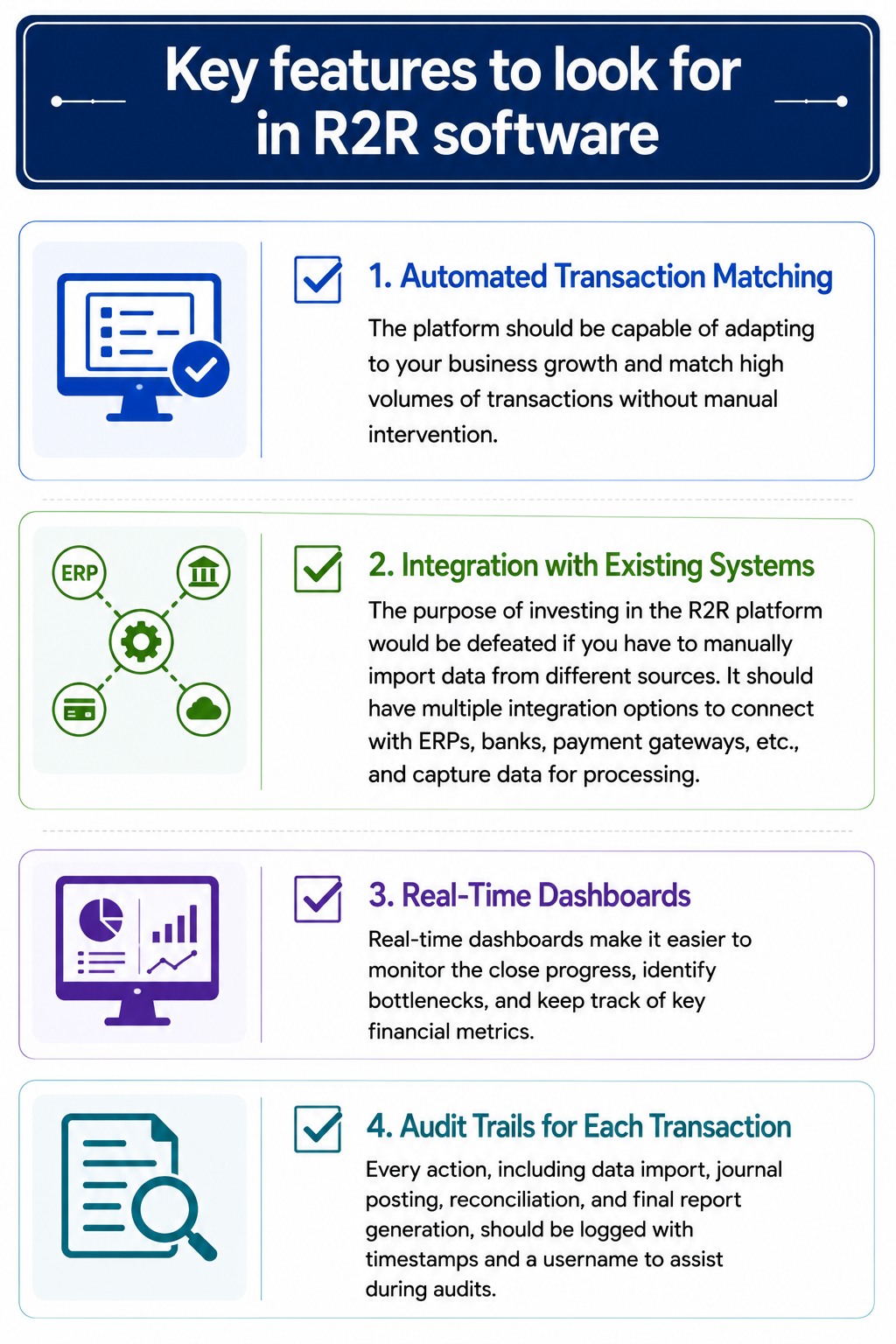
Every R2R platform has its own strengths, but there are a few features you should expect from any good solution.
1. Automated Transaction Matching
The platform should be capable of adapting to your business growth and match high volumes of transactions without manual intervention.
2. Integration with Existing Systems
The purpose of investing in the R2R platform would be defeated if you have to manually import data from different sources. It should have multiple integration options to connect with ERPs, banks, payment gateways, etc., and capture data for processing.
3. Real-Time Dashboards
Real-time dashboards make it easier to monitor the close progress, identify bottlenecks, and keep track of key financial metrics.
4. Audit Trails for Each Transaction
Every action, including data import, journal posting, reconciliation, and final report generation, should be logged with timestamps and a username to assist during audits.
{{banner1.1}}
How to Choose the Right Record-to-Report Software?
There are many platforms for automating record-to-report processes. However, the right choice depends on your organization’s needs. Consider the following factors when evaluating an R2R software:
- Whether you are a small business with straightforward bookkeeping needs or a large enterprise that deals with high volumes of complex financial transactions.
- The software’s integration capability with your current ERPs, accounting systems, banks, etc.
- Training curve and intuitiveness of the user interface.
- Security features like encryption, role-based access, and compliance with ISO 27001, PCI DSS, etc.
The Future of Record-to-Report Software
Like many other fields, AI is making its presence known in enhancing record-to-report processes and supporting faster and better financial consolidation. Here’s what R2R’s future looks like:
1. Real-Time Close
AI monitors transactions throughout the month, helping finance teams spot unusual entries as soon as they appear instead of during month-end close.
2. Enhanced Forecasting
AI agents are being built on diverse data sets, such as cash flow, market trends, etc., making them capable of delivering rolling forecasts as needed, without waiting for a finalized financial statement.
3. Instant Flux Analysis
By automatically recognizing variance and generating flux analysis, AI has freed up time for finance teams to focus on review and compliance instead of creating reports from scratch.
Wrapping Up
The right record-to-report software depends on your transaction volume, ERP setup, and reporting needs. What works for a small business won't necessarily work for a global enterprise managing multiple entities. The smartest move would be to choose a platform that scales with you as your transaction volume grows, while continuously providing real-time insight into business performance.
If your business handles a high volumes of complex transactions, Osfin is worth considering. It enhances data processing with 170+ integrations, performs lightning-fast reconciliations, and provides insightful reports through its comprehensive dashboards. Book a demo to learn more.
FAQs
1. What is the difference between R2R and P2P?
P2P and R2R serve different purposes. While P2P manages the purchasing process, R2R focuses on the financial close. It brings together financial data, reconciles accounts, and generates reports that reflect the company's financial performance.
2. What are the steps in the Record to Report process?
Records to report involve collecting transaction data from multiple sources, posting journal entries, reconciling accounts, and generating reports on the business’s financial performance.
3. What R2R software are suitable for small businesses?
Intuit QuickBooks and Sage Intacct are suitable R2R software for small and growing businesses.
4. What key features should businesses look for in record-to-report software?
When comparing R2R software, focus on features like seamless integrations, financial close automation, real-time dashboards, and audit trails.