Financial Process Automation: A Complete Guide for Modern Finance Teams
Introduction
Modern finance teams face mounting pressures to manage growing transaction volumes, meet tighter regulatory standards, and deliver real-time insights, all with limited resources. As expectations rise, manual processes no longer suffice. The shift toward digital finance is no longer optional but essential.
Financial process automation offers a powerful solution by digitizing and streamlining repetitive, rule-based tasks. From invoice processing to reconciliation, automation enhances accuracy, reduces costs, and frees up teams to focus on strategic decision-making. In this guide, we’ll break down what financial process automation really means, why it matters, and how your team can get started with real-world examples and proven strategies to help you succeed..
What this blog covers:
- What financial process automation is and why it’s essential for modern finance teams
- Key financial processes that can be automated: AP/AR, payroll, reconciliation, reporting
- Main benefits of automation: improved accuracy, faster cycles, reduced costs
- Technologies powering automation: RPA, OCR, ML, APIs
- Common challenges and pitfalls during automation implementation
- How Osfin’s solution supports end-to-end financial process automation
- Frequently Asked Questions on Financial Process Automation
What is Financial Process Automation?
Financial process automation refers to the technology-based execution of finance-related activities with little or no human intercession. Such activities span invoice processing, payroll, financial reporting, and reconciliation.
Unlike traditional methods that utilize spreadsheets or emails, financial process automation standardizes workflows and diminishes manual touchpoints through rule-based logic, robotic process automation (RPA), machine learning, and integration with core systems.
In effect, automation enables finance personnel to devote their efforts to high-impact analysis and decision-making rather than tedious, repetitive tasks.
Why Are Existing Financial Processes Not Working?
Conventional financial processes are becoming progressively less applicable because of the following reasons:
- Scale: Manual systems fail to scale along with the rising quantity of transactions.
- Error-Prone: Even a slight mistake in spreadsheet based systems can have significant consequences. Long chains of approval and collection delays halt a decision.
- Poor Visibility: Fragmented systems prevent teams from sharing real-time insights.
- Risk of Non-Compliance: Difficulty in implementing controls can lead to failed audits or penalties.
Automation directly distributes the burden of pain from these impacts, offering a direction to a transition.
Why financial automation matters in 2025
Manual work just isn’t built for this world anymore. Not because people aren’t capable, but because the volume and pace outgrow human rhythm. Automation steps in as the quiet support system, which is keeping the books clean, the numbers current, and the team focused on work that actually moves the business forward.
- Scale operation without scaling headcount: Automation lets you handle more transactions, accounts, and regions, without additional headcount.
- Satisfy regulatory requirements: SOX, ESG, and audit standards demand accuracy, automation ensures clean data, consistent controls, and audit trails that hold up under scrutiny.
- Get cash visibility: CFOs need live numbers to make daily decisions, not month-end surprises, automation delivers that.
- Automation that goes beyond static rules: 2025 tools predict issues, resolve exceptions, and learn patterns over time.
- Keeps costs lean: Companies want lean teams focused on strategy, not manual matching and data entry.
Which Financial Processes Can Be Automated?
Each firm has unique characteristics, but certain manual-intensive financial processes become prime targets for automation:
Accounts Payable (AP) and Invoice Processing: Automate invoice capture, validation, and approval.
Accounts Receivable (AR): Auto-generate and send invoices, and send payment reminders.
Expense Management: Streamline employee reimbursements, approvals, and policy compliance.
Payroll Processing: Wages, deductions, and taxes calculations could be automated. A few recommendations for:
Reconciliation: Match transactions from bank statements, ERP systems, and ledgers.
Financial Reporting: Consolidate and report financial information in real-time.
Tax compliance: Accurate real-time data should be utilized to track and file taxes.
This is just a small sampling of the applications for financial process automation, denoting truly the edifying potency afforded by automation.
Top Finance Automation Tools & Platforms Glance
1. Osfin - Reconciliation-Native Automation
Osfin is built for high-volume financial reconciliation. It pulls data from banks, ERPs, PSPs, loan systems, wallets, and ledgers, then matches transactions with AI instead of rules and spreadsheets. It’s designed for fintechs, lenders, insurers, e-commerce, and payments-heavy businesses where reconciliation is the main bottleneck.
Strengths
- 99%+ reconciliation automation and 99.9% matching accuracy at scale.
- Handles millions of rows and messy formats without custom scripts.
- Context-aware exception grouping (by root cause, not random lists).
- 170+ prebuilt integrations and 1–2 week implementation.
- Real-time cash and break visibility for finance and ops.
- Built AI-first, not bolted onto an old ERP or RPA stack.
Reviews & feedback
Teams call it “the thing that finally killed our reconciliation spreadsheet” and highlight fast go-live, minimal IT lift, and huge manual effort drop. Finance leaders like that it feels opinionated about reconciliation, not generic automation.
2. Tipalti – Global AP and mass payments
Tipalti focuses on accounts payable and global payouts. It captures invoices, codes them with AI, routes approvals, pays suppliers in 190+ countries, and handles tax forms and compliance along the way.
Strengths
- Strong global payments: currencies, methods, and entities handled natively.
- Good for vendor-heavy businesses: marketplaces, SaaS, agencies, platforms.
- AI for invoice capture, GL coding, and approval routing.
- Solid tax and compliance layer built in.
Reviews
Users like the reduction in AP workload and the “one place for all payables.” Some mention bumps in ERP sync or configuration in complex environments, but once stable, it becomes the AP backbone. Many pair it with a reconciliation tool like Osfin to close the loop cleanly.
3. HighRadius – Autonomous order-to-cash
HighRadius is an order-to-cash automation suite. It wraps credit, invoicing, collections, cash application, and deductions into one AI-driven platform, aimed mostly at large enterprises with serious AR complexity.
Strengths
- End-to-end AR coverage: from risk to collections to disputes.
- Strong AI and agent-like flows for collections and cash application.
- Great fit when DSO, bad debt, and AR team productivity are the burning issues.
- Deep O2C analytics and forecasting.
Reviews & feedback
Enterprise AR teams praise the DSO improvements and automation depth, but call out the learning curve and project overhead. It’s seen as a “transformation” platform, where Osfin is more of a fast, focused win on the reconciliation layer.
4. Workiva – Connected close and reporting
Workiva sits on the financial close, reporting, and compliance side. It connects data from many systems so teams can collaborate on financial statements, consolidations, SEC filings, and ESG reports with strong audit trails.
Strengths
- Excellent for regulated and multi-entity environments.
- Real-time linking of numbers across reports and decks.
- Strong governance, version control, and documentation.
- Supports close, GRC, and ESG in one connected workspace.
Reviews & feedback
Controllers and reporting teams like the control and collaboration. It’s often described as “the place where numbers are signed off,” not where they’re reconciled. Many teams use Osfin to clean and reconcile the data first, then feed that into Workiva for a smoother close.
5. Stampli - P2P Automation With an AI “AP Employee”
Stampli focuses on procure-to-pay. Invoices, POs, approvals, and payments all sit in one place, powered by Billy, their AI “AP employee” that learns your cost centers, vendors, and approval rules.
Strengths
- Very user-friendly for AP and approvers; low-friction rollout.
- Strong PO and non-PO invoice handling with smart matching.
- Tight P2P view: requests, approvals, invoices, and payments in one flow.
- 70+ ERP integrations for mid-market stacks.
Reviews & feedback
Users highlight ease of use, quick adoption, and big time savings in invoice handling. For teams that add Osfin, Stampli tends to own the front-end AP flow while Osfin takes care of accurate, high-volume reconciliation across all rails.
Here’s how they stack up against each other:
Types of Automation in Finance
Clarity gives teams room to think. When you understand what each type of automation can do, it becomes easier to build the kind of finance function that runs with ease instead of effort.
This ladder keeps things simple. Five levels. Each one opens more space for better work.
Type 1: Task Automation (RPA)
Here, the bots handle the routine and grunt work, like the clicks, the copies, the data shuffling that never seems to end. It’s useful when workflows are stable and the rules never shift.
Type 2: Document Intelligence (IDP)
IDP reads the documents finance teams depend on: invoices, receipts, remittances, and contracts. It recognizes structure, extracts details, and adapts to new formats without breaking.
Type 3: Process Orchestration (BPA)
BPA ties everything together, like systems, approvals, checkpoints, so a process moves the same way every time. It replaces scattered tasks with a coherent flow, bringing consistency to cycles like P2P, O2C, and reconciliation.
Type 4: Intelligent Process Automation (IPA)
Automation begins to pay attention. It learns patterns, adapts to small shifts, and smooths out the bumps that used to slow teams down. Exceptions drop, cycle times tighten, and the system starts doing more of the thinking for you.
Type 5: Autonomous Finance Agents
Agents operate with guardrails instead of step-by-step instructions. They evaluate context, make decisions, adapt to new signals, and keep work moving without waiting on humans. Approvals, routing, forecasting, and break resolution, much of it becomes self-managed.
What are the Benefits of Financial Process Automation?
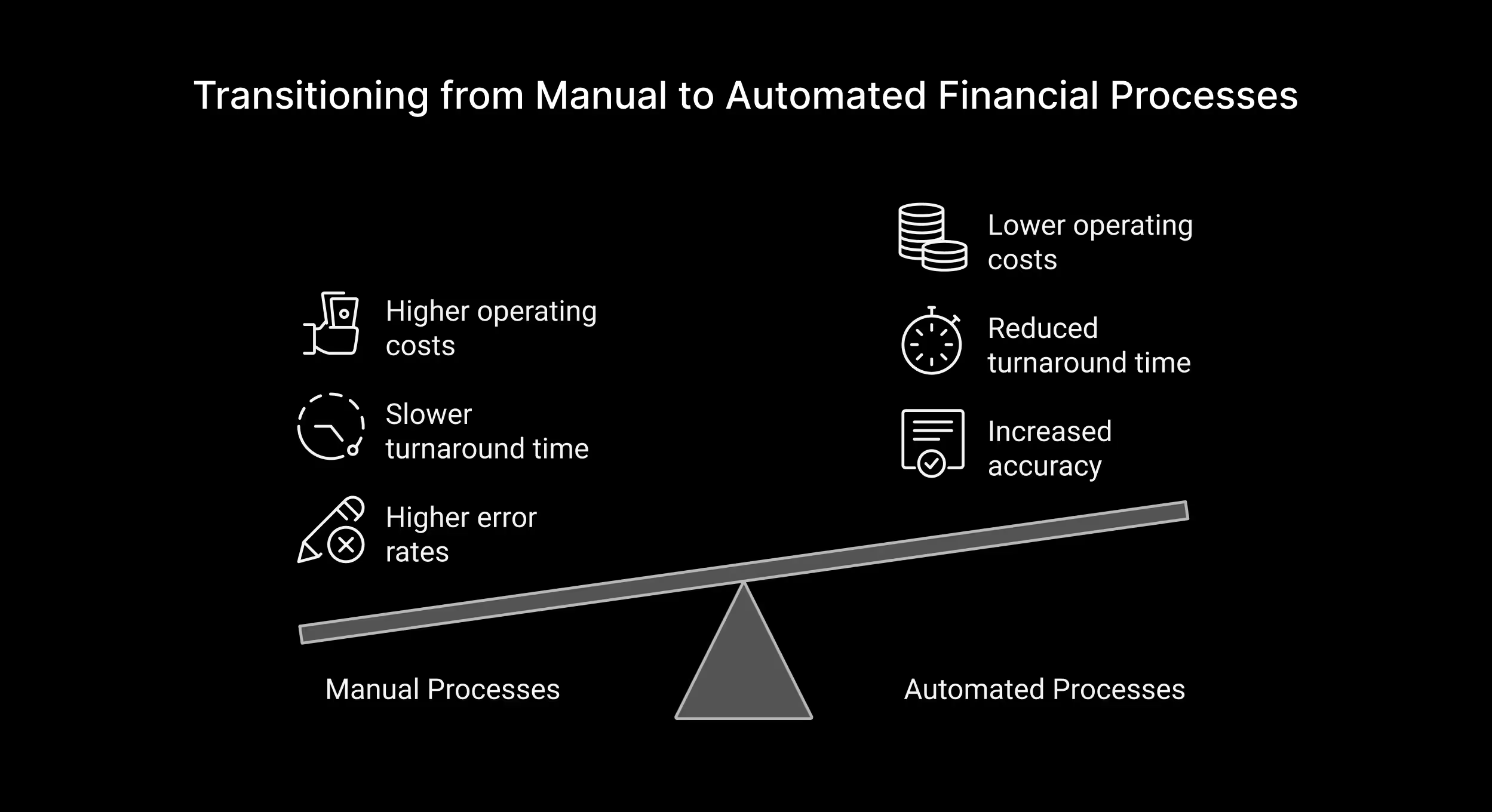
The benefits of financial process automation are now manifold and are measurable and strategic to long-term growth. Here is the wide-ranging effect of automation in finance operations:
1.Increased Accuracy
Errors happen during manual data entry, especially in complex, high-volume scenarios. Automation practically removes the chances of human errors in calculations, data transport, and reconciliation processes, thus providing a truly reliable basis for financial reporting. These corrections otherwise incur potential costly errors.
2.Reduced Turnaround Time
Approval of invoices, bank reconciliation, payment processing, etc., which earlier took days to finish, can now be done in minutes or seconds. This speed allows the organization to be more responsive in the light of speeded-up checking and closing of the books at month-end or year-end.
3.Lower Operating Costs
By automating repetitive and time-consuming tasks, companies almost eliminate the need for idle manpower in finance operations. It reduces overhead costs, leaving the teams to focus more on analytical and strategic jobs instead of tedious administrative work.
4.Enhanced Compliance and Control
Automated workflows have audit trails, approval hierarchies, and rule-based checks embedded in them to keep organizations compliant with regulatory requirements such as SOX, IFRS, or GAAP. Anomalies that indicate probable fraud or compliance risk are signaled with real-time alerts.
5.Better Financial Insight
The dashboards and analytic tools that are integrated with automated solutions provide real-time insights into cash flow, overdue payments, and overall financial health. This insight allows for better forecasting and budgeting, as well as quicker decision-making.
6.Growth Scalable
As businesses grow, transaction volumes and complexities similarly rise. Financial automation solutions can absorb additional loads without requiring a proportional increase in personnel, therefore allowing team scalability of operations.
7.Higher Employee Satisfaction
Repetitive activities like reconciling transactions or entering vendor information can be rather de-motivating. Automation provides a pathway for finance practitioners to move toward more meaningful work—things like strategic planning, forecasting, and analysis—which ramp up morale and job satisfaction while also reducing turnover.
These advantages do not merely optimize day-to-day work; they also uplift the finance teams into strategic partners within the organizations.
How to Automate Financial Processes: A Step-by-Step Guide
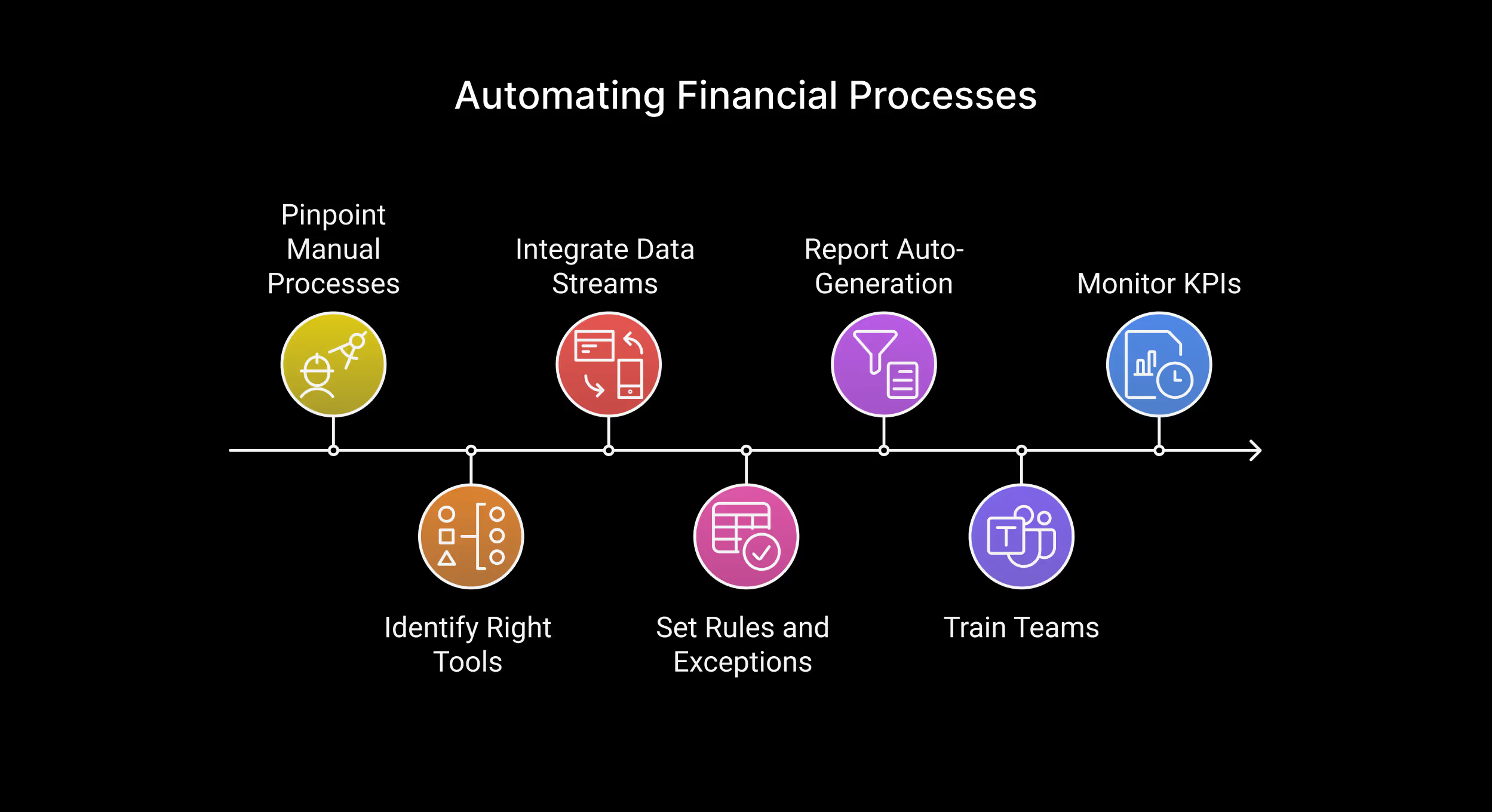
For finance teams, automation may seem complex at first, but it becomes manageable when broken down into actionable steps.
1. Identify Manual Processes
There are several areas characterized by intensive manual work with high levels of inaccuracies. They include:
- Payment Reconciliations
- Exception handling
- Manual Report generation
- Month-end closings
- Intercompany reconciliations
2. Identify the Right Tools
Dimensions to assess in automation tools:
- Pre-built workflows
- Low-code customization
- Integration capabilities with CBS, ERPs, payment gateways
Osfin provides a specific reconciliation and finance automation solution, which can streamline the entire process without much IT involvement.
3. Integrate Your Data Streams
Create flows of financial data by integrating core banking systems (CBS), payment gateways, and ERP platforms with the sleected tools
4. Rule and Exception Set
Specify all matching rules, thresholds, and triggers for exceptions such that the system would know how to respond regarding these cases automatically.
5. Report Auto-Generation
Schedule automated reports, dashboards, and alerts to have real-time visibility.
6. Train Teams and Manage Change.
Train teams for transition to new systems. Use change management frameworks to drive adoption and lessen resistance.
7. Key Metrics to Track After Automation
Monitoring the right metrics ensures your automation journey stays on track:
- Cycle Time
- Error Rate Reduction
- Manual Intervention Rate
- Time to Close Books
- Employee Productivity Increase
- Automation ROI
Tracking these KPIs helps validate success and informs future process improvements.
Technologies Used in Financial Process Automation
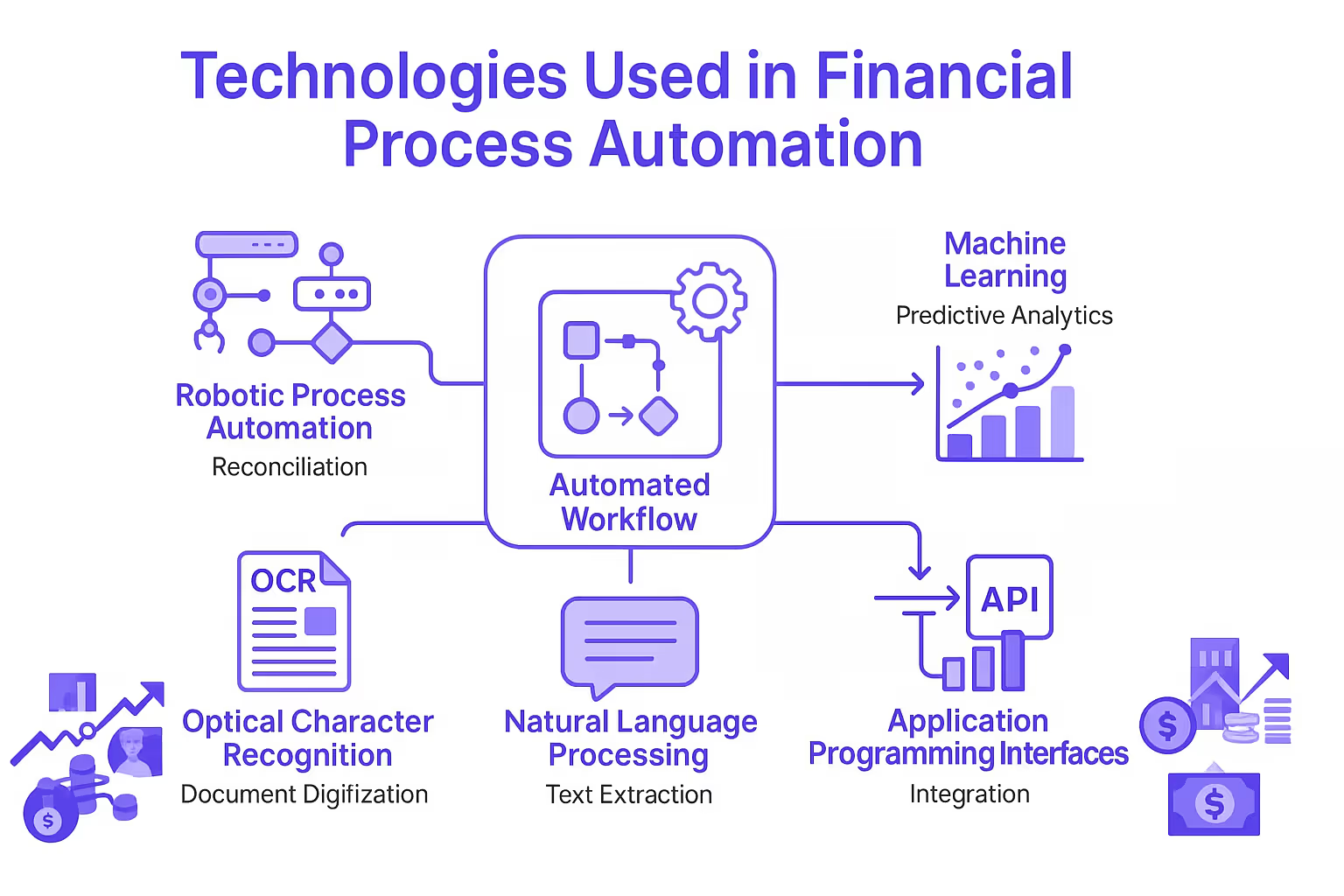
A range of technologies support financial process automation:
- Robotic Process Automation (RPA): Automates repetitive, rules-based tasks.
- Machine Learning (ML): Enables predictive insights and anomaly detection.
- Optical Character Recognition (OCR): Digitizes paper-based documents.
- Natural Language Processing (NLP): Extracts meaning from unstructured text.
- Application Programming Interfaces (APIs): Enables real-time data integration.
OsFin combines these technologies into an integrated solution purpose-built for reconciliation, exception handling, and financial close workflows.
Challenges of Financial Process Automation
Sometimes the hardest part isn’t the technology. It’s everything wrapped around it, like the habits, the systems, the old ways that don’t bend easily.
Challenges
- Data Readiness: Poor or inconsistent data slows automation before it starts.
- Process Clarity: Legacy workflows with unclear steps break once you try to automate them.
- System Fragmentation: Older tools without APIs force manual patches that limit automation depth.
- Team Adoption: Change stalls when people don’t understand the value or feel unsure of new tools.
- Skill Gaps: Finance teams need light technical skills to operate and maintain automation well.
Risks
- Security Exposure: Sensitive financial data needs strong controls or risk grows quickly.
- Compliance drift: Automating steps without updating controls can create audit and SOX gaps.
- Data quality errors: Bad data leads to mismatches, failed reconciliations, and inaccurate reporting.
- Cost overruns: Complex integrations or shifting scope can push projects past budget.
- Vendor Lock-In: Closed platforms make it expensive to switch or scale later.
Best Practices for Financial Process Automation
Automation works best when it feels calm, clear, and predictable. Not like a big-bang project, but like a steady upgrade to the way your team already thinks and works.
These best practices are here to help with that.
1. Fix the process before you automate it
If the workflow is messy, automation just hard-codes the mess. Map the current flow, remove dead steps, simplify approvals, and define a clean “happy path” before you touch tools.
2. Prioritize high-impact, low-drama wins
Start where volume is high and rules are clear. Think AP, expenses, and bank recs. Early wins here build credibility, free up hours, and fund the harder phases.
3. Get your data house in order
Bad master data ruins good automation. Standardize vendor, customer, and account data, plus formats and codes across systems, so matching, posting, and reconciliation don’t constantly break.
4. Match the automation type to the job
Don’t throw RPA at everything. Use RPA for simple UI tasks, IDP for documents, BPA for end-to-end workflows, IPA for exception-heavy processes, and agents when you’re ready for guardrail autonomy.
5. Design exception handling on purpose
The real cost sits in exceptions, not happy-path items. Define exception types, owners, routing rules, and SLAs up front, and build them into the workflow so nothing gets stuck in limbo.
Conclusion
For contemporary financial teams, financial process automation is simply not a “good to have”-it is a necessity.. Whether you're automating reconciliation, reporting or expense processing, all of them have one goal in mind: better accuracy, enhanced speed of insights, and more strategic decision-making.
With solutions like Osfin, automation can be achieved even with smaller teams. Start small and choose the right tools and measure the impact. Before you know it, you will find your finance team working with more confidence and speed.
FAQs on Financial Process Automation
1.What is actually financial process automation?
Financial process automation involves using digital tools and technologies to perform financial activities with less human intervention.
2.Can you give a few financial process automation examples?
For instance, automating the approvals of invoices, payroll production, reconciliation, and financial statements.
3.In what way does it help lower costs in financial process automation?
This would include the lessening of manual work, reduction in errors, increased speed of processes, fewer overhead costs, and increased efficiencies.
4.Is automation suited for very small finance teams?
Yes, automation is suitable for teams of any size. Smaller teams, in particular, can use it to eliminate bottlenecks, boost productivity, and scale their operations more effectively over time.
5.What's the first thing you do to automate a financial process?
Identify processes that are repetitive, error-prone (such as reconciliation) and risky, and initiate a pilot program for ROI validation.
6. What is the difference between RPA and BPA?
RPA (Robotic Process Automation) automates individual tasks by mimicking human clicks and keystrokes, while BPA (Business Process Automation) automates entire workflows end-to-end.
RPA handles repetitive, rule-based actions in a single system, but BPA connects multiple systems, routes approvals, enforces rules, and manages the full lifecycle of a process.
{{banner3}}