Auto-Posting Journal Entries for Loan Reconciliation
Manual journal entries often consume more time and resources than you realize. Every loan repayment, fee, settlement, or write-off must also be entered into the ERP. If you miss an entry or simply post it late, you can end up with mismatches between your loan management system, core banking system, and the general ledger.
Loan journal entry automation can help replace manual work and ensure all entries are posted automatically, keeping your loan records reconciled across every system.
In this article, we'll look at how automated journal entry posting works for loan reconciliation and how you can get it right.
Key Takeaways:
- Manual journal entry posting isn't practical when you're dealing with loans at scale. It increases the risk of errors that take longer to fix than the entries themselves.
- Auto-posting uses predefined rules to create, validate, and post journal entries automatically. It keeps your general ledger in sync with your loan management system at all times.
- Interest accruals, principal reductions, fee entries, loan disbursements, and rollovers are among the loan events that can be automated.
- Automated posting also gives you stronger audit trails, better compliance documentation, and near-zero error rates.
What is Auto-Posting of Journal Entries in Loan Reconciliation?
Every loan-related financial transaction, such as a repayment, a fee, or a write-off, needs to be recorded as a journal entry in your accounting system. Doing this manually means:
- Someone has to review each transaction
- Pick the right accounts
- Enter the amounts
- Post it
This process is relatively straightforward when transaction volumes are low. At scale, however, maintaining accuracy becomes much more difficult.
Auto-posting replaces the manual process entirely. The system uses predefined rules to determine how each transaction maps to the correct accounts. Then, it creates, validates, and posts the journal entry automatically.
The goal, especially in loan reconciliation, is to make sure every event is recorded correctly and on time. This will ensure your general ledger always matches your loan management system.
{{banner1}}
Why Auto-Post Journal Entries for Loan Reconciliation?
Automating journal entry posting for loan reconciliation offers a host of benefits. Here are some practical reasons to consider it:
1. Faster Financial Close
Regular posting throughout the month reduces the amount of work that needs to be done during close. By the time the close begins, the ledger is already up to date and requires fewer last-minute adjustments.
2. Improved Accuracy
Manual entries are very prone to errors. Automated systems, on the other hand, apply the same rules to every transaction, every time. As such, if your rules are right, the entries are right, too.
3. Better Compliance
Automated systems maintain detailed, accessible records of every journal entry posted. Need urgent documents for regulatory requirements? They're already there, organized and ready in one place.
4. Stronger Audit Trails
Every automated entry links back to the source transaction that created it, the rule that determined the accounting treatment, the validation checks it passed, and when it was posted. Auditors can trace any balance back to its origin without your team getting involved.
Which Loan Entries can be Auto-Posted?
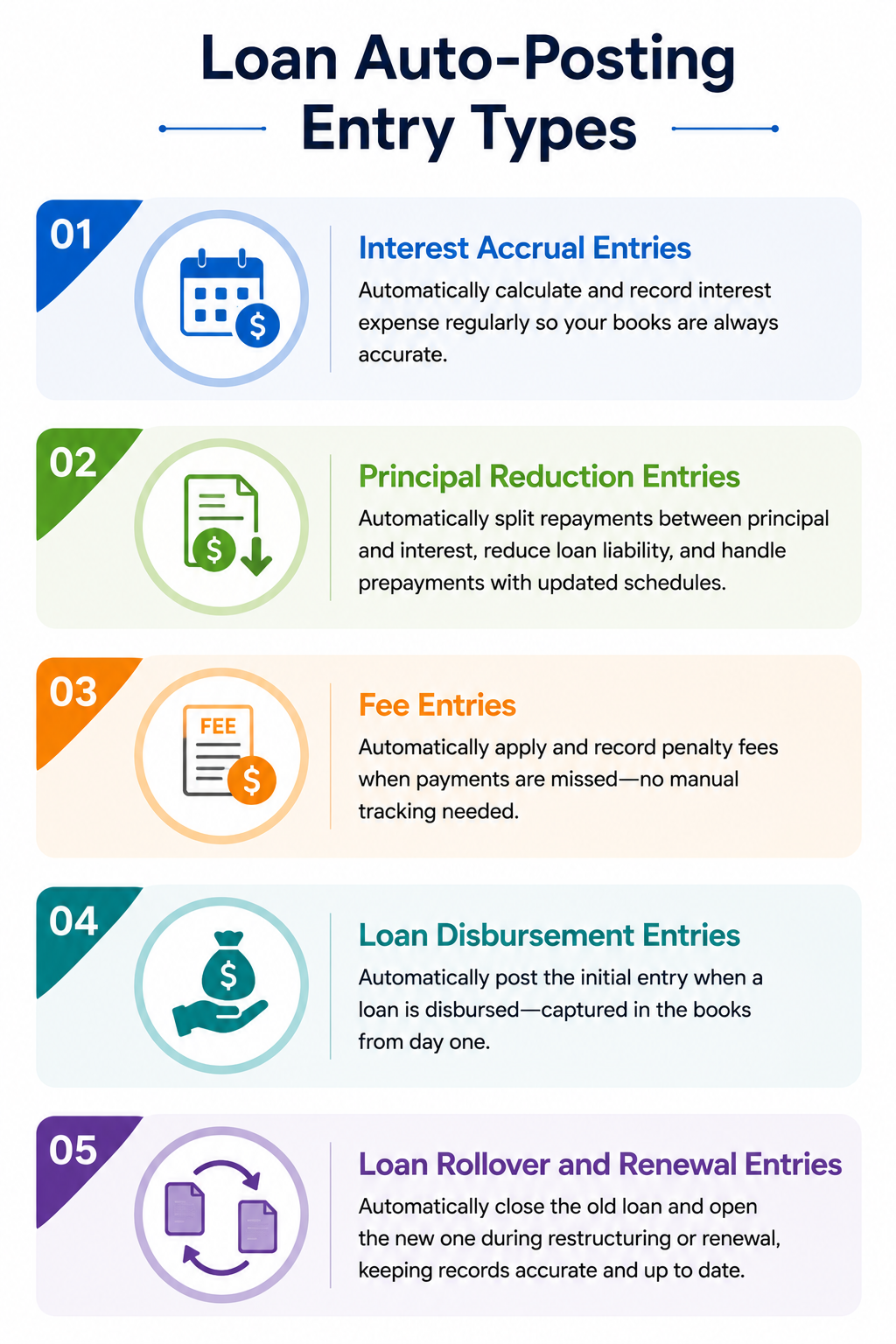
When it comes to loans, there are various types of transactions. All of them need a journal entry. Here are the key ones that auto-posting systems can handle
1. Interest Accrual Entries
Instead of waiting for month-end, automated systems calculate and record interest expense on a daily, weekly, or monthly basis. This ensures your books show the correct interest balance at any point in the month, not just after a manual review at close.
2. Principal Reduction Entries
Every repayment needs to be correctly split between principal and interest. Auto-posting handles this automatically, reducing the loan liability by the right amount each time a payment comes in. It also covers prepayments, allocating lump-sum payments toward the principal balance and recalculating the amortization schedule accordingly.
3. Fee Entries
When a payment is missed, the system automatically triggers a penalty entry. It debits the borrower's account and credits penalty revenue, without anyone having to manually identify and record the charge.
4. Loan Disbursement Entries
When you disburse a loan, the system immediately posts the initial entry. This way, the transaction is entered in the books from day one without any manual intervention.
5. Loan Rollover and Renewal Entries
When a loan is restructured or renewed, auto-posting generates the entries needed to close the existing loan and open the new one. This keeps your records clean and accurate without requiring your team to manually track and record each change.
Manual vs Automated Loan Journal Entry Posting
We'll reiterate: when you're working with a low volume of transactions, having someone review each transaction and post it manually is manageable.
However, at scale, you're dealing with multiple loan events. A manual approach cannot keep up with the volume, accuracy, and consistency. You see, when multiple people handle entries differently, or when errors made under month-end pressure need correcting, the process can become unnecessarily complicated and time-consuming.
Automation addresses all of this by applying the same rules to every transaction, every time.
How Does Auto-Posting Journal Entries Work?

Auto-posting journal entries involves a four-step process:
Step 1: Data Ingestion
The system pulls transaction data from your operational systems. These include your ERP, treasury system, and loan management platform.
Step 2: Rule Application
For each qualifying transaction, predefined accounting rules guide the posting process. They determine which accounts are affected, how values are calculated, and when the entry is recorded.
Step 3: Validation
Before entries are posted, the system checks that the accounting is balanced and the relevant accounts are valid. Transactions that appear unusual are flagged for further review.
Step 4: Posting
Once validated, the entry posts automatically. Controls are built into the workflow too, keeping entry creation, approval, and posting as separate responsibilities.
{{banner1.1}}
What are the Best Practices for Implementing Auto-Posting in Loan Operations?
Ready to implement loan journal entry automation? Keep these best practices in mind:
1. Audit Current Process
Before configuring anything, see how journal entries are being handled currently. Review where the process slows down, where mistakes occur, and which entries are handled repeatedly. This creates a clear benchmark for the changes ahead.
2. Define Posting Rules
Every entry type needs a clearly documented rule that reflects your accounting policies. Vague or incomplete rules lead to incorrect postings, which defeats the purpose of automation.
3. Use Consistent Templates
Set up recurring templates that align with your chart of accounts and reporting structure. This will make financial reporting cleaner and audits easier.
4. Build in Monitoring Controls
Put checks in place to catch failed postings, duplicate entries, or skipped schedules. Automated alerts enable your team to fix problems before they affect your close timeline.
5. Ensure Audit Readiness from the Start
Don't treat approval workflows, validation checks, and system logs as an afterthought. Build them into the setup so every entry has a traceable record behind it.
6. Review Regularly
Oversight remains important, even with automation in place. Make sure posted entries align with source data, validate that rules are still relevant, and review any exceptions. These checks help keep the process on track.
The End Note
When you're dealing with a constant flow of repayments, fees, accruals, and restructuring events, manual posting can be inconvenient. Loan journal entry automation helps streamline the process without errors, delays, or gaps.
If you're looking for a reconciliation platform built to handle this at scale, Osfin is worth a look.
- Data Ingestion
Osfin connects to 170+ data sources and accepts files in any format. It also normalizes and standardizes data, applies custom deviation tolerances to filter out poor-quality records, and detects duplicates and outliers before they cause problems.
- Reconciliation
Osfin's logic-based matching engine can handle complex transaction relationships, including one-to-many, many-to-one, and multi-way reconciliations across two, three, four, or five data sources. The platform can reconcile up to 30 million records in 15 minutes. Plus, it auto-reconciles payment gateway reports with commission, tax, and fee breakdowns.
- Exception Handling
Osfin automatically flags unmatched transactions and assigns an accurate reason to each one. It then routes exceptions to the right team member through a built-in ticketing and exception-handling engine. Live dashboards give real-time visibility into match status, open exceptions, and exposure at any point.
- Output
Every reconciliation produces a compliance report with complete transaction history and traceability. Osfin secures your data with 256-bit encryption, maker-checker flows, role-based access, and two-factor authentication. It is also compliant with SOC 2, PCI DSS, ISO 27001, and GDPR.
Ready to see it in action? Book a demo with Osfin today.
FAQs
1. What is a journal entry for a loan?
A loan journal entry is a record of any financial transaction tied to a loan. Every time a repayment comes in, interest accrues, a fee is charged, or a loan is disbursed, it needs to be recorded in your accounting system as a debit and a credit.
2. Can journal entries be automated?
Yes. You can use automation tools to set predefined rules to create, validate, and post journal entries without any manual input.
3. How does journal entry automation help in loan reconciliation?
Loan reconciliation depends on every event being recorded correctly and on time across your loan management system, core banking system, and general ledger. Automation posts these entries in real time, so your records stay consistent.
4. Which loan journal entries can I automate?
Most recurring and rule-based loan entries can be automated. These include interest accruals, principal reductions, fee and penalty entries, loan disbursements, and rollover or renewal entries.