What is Expense Reconciliation and How it Works?
Today, the finance sector has moved from digitization to the automation of operations due to the high volume and variety of transaction data generated every day. Despite the rapid adoption of automation software and processes, many banks still reconcile expenses manually.
Challenges such as manual errors, fraud risks, and budget overruns silently affect your financial institution's profitability and compliance. In this article, we'll look at expense reconciliation, how to reconcile expenses, its types and solutions to the most common challenges.
What Is Expense Reconciliation?
You can look at expense reconciliation as the process of verifying and matching your recorded expenses with supporting documents such as receipts, bank statements, invoices, or credit card transactions. This ensures accuracy and compliance of the expenses recorded.
AI-optimized platforms like Osfin confirm that every operating expense reconciliation aligns accurately with general ledger entries. Also, such automation features help to avoid manual errors and discrepancies that could trigger regulatory penalties or misreported financials.
It strengthens overall financial health by preventing fraud, controlling budgets, and enabling reliable reporting essential for successful audits.
How to Reconcile Expenses?
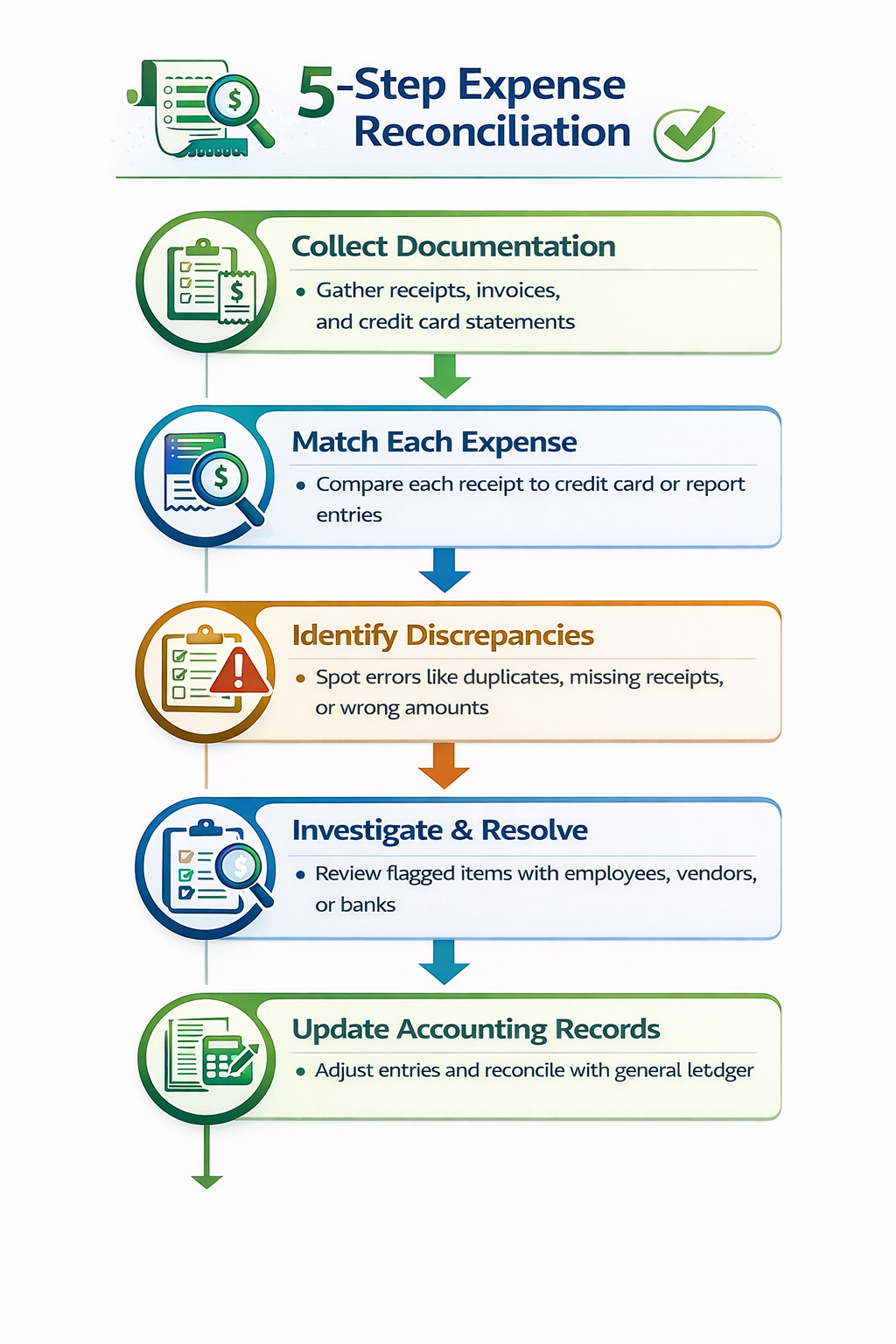
Here is a simple five-step process to reconcile expenses asa bank or any other financial institution managing high-volume transactions. You begin by collecting all necessary documents, matching transactions, figuring out the issues, resolving them and updating the ledger.
1. Collect Documentation
You need to start by creating a comprehensive dataset that includes data from all receipts, bank and credit card statements, invoices, and expense reports. This process can be tedious to deal with, as you might have to parse through a variety of formats for matching.
Osfin is a file format agnostic platform that supports over 170 integrations to streamline and help you import data from multiple sources, regardless of format. It also applies custom deviation tolerances during ingestion to filter poor-quality data before reconciliation.
2. Match Each Expense
Next, all the transaction amounts, dates, vendors and details should be verified against your accounting records. Automation in financial processes can handle such tricky many-to-one or one-to-many links that are common in treasury operations without breaking a sweat. Osfin offers expense reconciliation with 100% accuracy, and it reconciles 30 million records in 15 minutes.
3. Identify Discrepancies
You need to scan for potential discrepancies, such as missing receipts, duplicates, or policy slip-ups. Figuring out such issues early can help you avoid financial fraud. Osfin offers exception handling that automatically flags unmatched transactions and also assigns them an accurate reason. Further, it routes the issues to the respective teams for resolution. Osfin's live dashboard also shows details like match status, exposure, and exception queues.
4. Investigate & Resolve Issues
Once the issues are identified, you can further investigate and resolve them by communicating with your team, vendors, and businesses to confirm facts, then tweak the entries to fix the issues. Platforms that offer built-in audit trails help ensure compliance for treasury reviews.
Osfin delivers a compliance report and maintains audit-ready workflows with complete traceability and transaction history. It secures the data with 256-bit encryption, role-based access and also complies with SOC 2, PCI DSS and GDPR requirements.
5. Update Accounting Records
Finally, you need to update your ledgers with adjustments with notes on operating expense reconciliation and lock it down for approval. Once approved, run a final balance check against bank totals, then update your ledger or ERP. You need to perform transaction reconciliation monthly, and if you are dealing with a large volume of transactions, then weekly reconciliation should be performed.
{{banner1}}
Types of Expense Reconciliation
Financial institutions and treasury teams can tailor expense reconciliation for their respective workflows. This leads to different types of expense reconciliations that help you spot the repetitive, time-consuming tasks, and you can leverage automation where it makes the most difference.
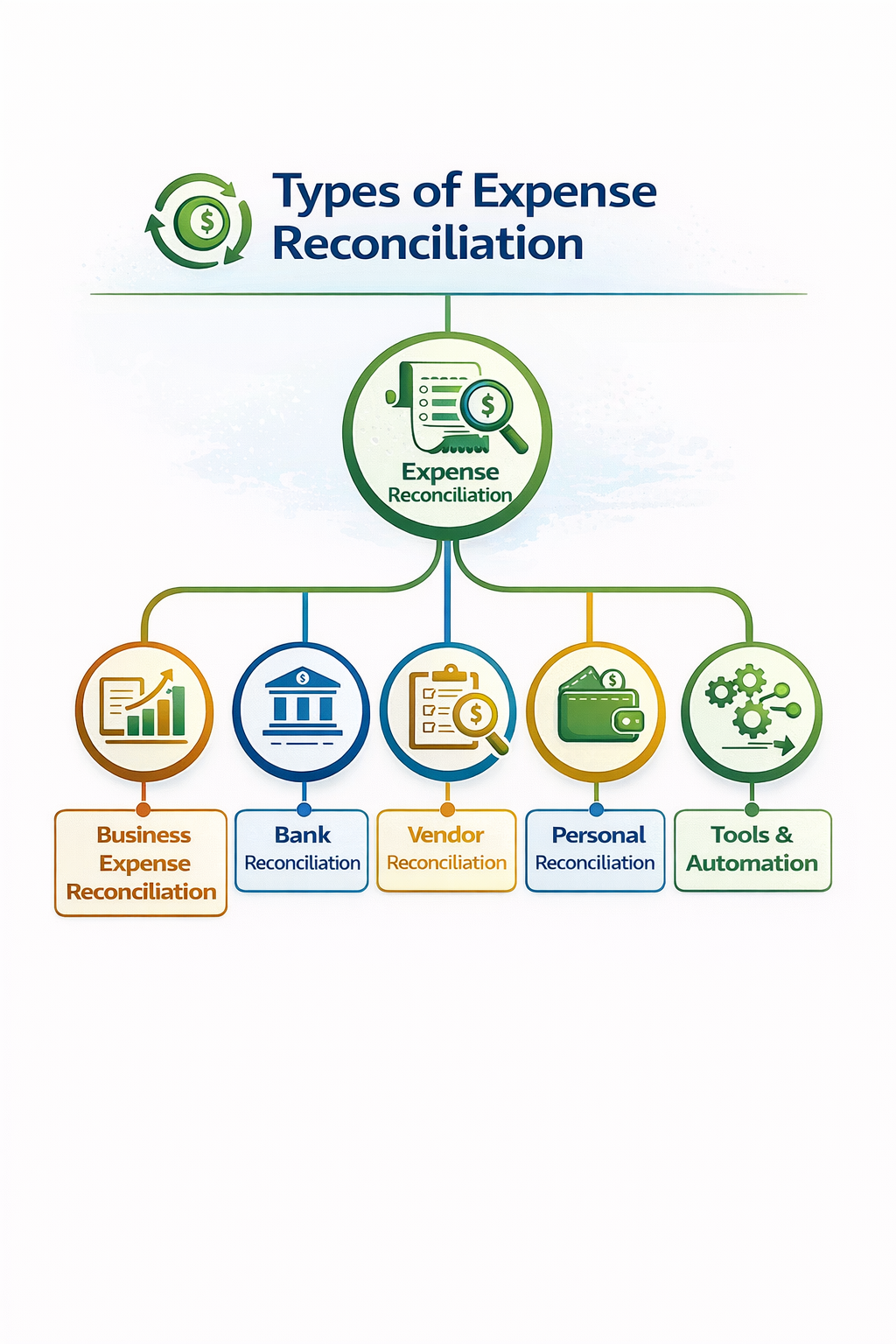
Business Expense Reconciliation
Here, you have to match employee expense reports that include travel receipts and supplies against your accounting records to verify expense approvals and policy adherence.
For financial institutions, it controls operating expense reconciliation by flagging overspends or personal invoices. This helps to prevent leakage in corporate card programs.
Vendor Reconciliation
Here, you need to compare supplier invoices to what you actually paid and your purchase orders to catch overpayments or disputes. Card providers rely on this to spot duplicate invoices early, especially for merchant fees and significant vendor settlements.
Personal Reconciliation
You verify personal business expenses like executive travel or home office costs against receipts. This ensures proper reimbursements or tax deductions. Large banks don't use this type of expense reconciliation much, but you can notice treasury teams applying it to C-suite spending with tight controls.
Tools & Automation
Automation helps banks and other financial institutions cut manual reconciliation time from days to minutes. Here, we'll look at the difference between manual and automated reconciliation and how automation software paves the way to the future of fintech.
image caption here (optional)
Automated vs Manual
Spreadsheets are a perfect tool for small datasets, but not for banks, because they are not built to handle a large number of transactions. Tools like spreadsheets also tend to introduce errors and versioning issues that can lead to fraud and late closes for bank reconciliation. That's why automated software is a better alternative, and it saves substantial time, scales better, and flags issues in real time.
Expense Management Software
Modern software offers a unified solution for banks and treasury teams. Such platforms combine a range of features in one single interface to allow seamless financial reconciliation and are called expense management software. It offers features like:
- AI-Powered Automated Matching to leverage agentic AI to apply intelligent rules and continuous learning to align expenses with ledgers, fuzzy matches, and multi-line invoices without any errors.
- It supports integration with SAP or Oracle-like ERP systems and automatically posts corrections or adjustments to remove double-entry or duplicates from the records.
- This software is also responsible for handling global, multi-currency transactions from card providers, and it automatically converts FX rates for accurate international expense reconciliation.
Best Practices for Automation
If you are looking to adopt automation into your finance workflow, here are some best practices to ensure seamless productivity.
- Set Clear Rules for Direction: You need to give precise data instructions to expense reconciliation tools like Osfin. These can include a 24-hour receipt upload mandate, standardized categories, and approval thresholds.
- Train Your Team for Automation: Use simple videos to train your team, and focus on exception handling and dashboard navigation to help them adopt automation in their working style.
- Monitor and Refine Processes: Review live dashboards for match rates and exposure, and accordingly tweak the rules for refinement and better reconciliation.
{{banner3.1}}
Challenges & Solutions of Expense Reconciliation
Issues like lost receipts and data mismatches can delay closings and raise compliance issues. But you can implement simple solutions to ensure accuracy and speed when operating expense reconciliation.
Missing or Unorganized Receipts
Lost receipts can create audit gaps and unverified spends in card programs. Some tips to deal with such situations are:
- 48-hour digital uploads rule via mobile reminders and auto-escalation emails.
- Use OCR to scan financial documents and records instantly.
- Centralize your storage in the cloud for instant access.
Mismatching of Data
Sometimes, data can vary due to rounding, taxes, and fuzzy vendor names like Amazon and Amazon Marketplace. Such mismatches can add to the exception queue for financial institutions. To curb such issues, you should:
- Charge 2% tolerance on fees and fuzzy matching for 90% name similarity.
- Normalize categories for transactions across teams.
- Standardize currencies automatically using real-time FX rates.
Time-Consuming Manual Efforts
Manual reviews can take up to weeks when analysts have to work with spreadsheets and high-volume transactions. To overcome such delays, you need to:
- Run automation processes daily.
- Prioritize solving high-value exceptions.
- Leverage agentic AI for routine matches.
How Does Osfin Help You Resolve Expense Mismatches?
So, let's look at an example to understand how automation benefits expense reconciliation. Suppose a large financial institution that has $250K vendor mismatches from unhandled fee breakdowns in supplier payments. This exposes them to fraud risks and possible PCI violations.
They decided to use Osfin, a file-format agnostic and an AI-powered expense reconciliation tool that automatically flags unmatched items with precise reasons, escalated through the ticketing engine to AP teams to be resolved. Osfin also provides live dashboards to track exposure and secures your data with 256-bit encryption, role-based access and GDPR, PCI DSS compliance.
As a result, the exposure dropped to zero in hours instead of weeks, and funds were fully recovered with no overpayments or fraud losses. The financial institute's month-end closes accelerated 5x faster, and the company cleared all audits easily.
Conclusion
It is necessary for banks, financial institutions, card providers and treasury services to perform expense reconciliation to avoid errors, fraud and budget overruns. And with a clear understanding of the types of expense reconciliation and its steps, you can carefully devise your automation strategy for your reconciliation process.
Osfin is a reliable and trusted expense reconciliation platform that can help you reconcile 30 million records in 15 minutes with 100% accuracy.
Are you ready to eliminate manual reconciliation risks and close books without any delay? Schedule your free Osfin demo today!
FAQs
1. What is reconcile expenses?
Reconciling expenses is a process in which you match your actual business expenses with accounting records like receipts, invoices or bank statements. Expense reconciliation is important to ensure that all records and transactions are accurate, legitimate and carefully categorized to avoid errors and fraud.
2. What is the difference between expense reporting and expense reconciliation?
When you, as an employee, submit claims for reimbursement, it is called expense reporting. While expense reconciliation is a financial verification process in which you match submitted reports to bank statements, general ledger or receipts for accuracy and compliance.
3. How often should a business reconcile expenses?
You should ideally reconcile expenses monthly. But if you deal with high-volume businesses or tight cash flows, then you should perform expense reconciliation weekly or even daily for better control and reliable error resolution.
4. What documents do I need to reconcile expenses?
To reconcile expenses, you need financial documents like receipts, vendor invoices, credit card or bank statements and internal records like payable ledger and purchase orders.
5. Can automation eliminate manual reconciliation entirely?
Automation can drastically reduce manual reconciliation. It shifts the human focus from repetitive and tedious transaction matching tasks to managing exceptions, investigating complex issues with intelligent matching and live dashboards for real-time visibility.