Auto-Posting Adjustment Entries
Since the advent of the 21st century, we have seen a rise in businesses engaging in subscription and upfront payment models. This is especially common in SaaS, manufacturing and consulting companies that wish to have a predictable cash flow and avoid non-payment risk.
However, under the accrual basis of accounting, these advance payments cannot be recognised in the current period's income statement. They must be correctly applied to the accounting period in which the revenue was earned or the expense was incurred. That is why, at the end of every month, we see accounts teams buried in piles of transactions that need to be adjusted in the balance sheet.
But this reality can be changed by utilising tools that can auto-post adjustment entries, saving the accounts team time for strategic tasks. Let’s explore that in this article.
Key Notes
- Auto-posting refers to the process in which adjustment entries like accrued revenue or accrued expense are automatically recognised and posted in the general ledger.
- Manually posting adjusting entries is time-consuming, has a high error rate and can delay closing cycles.
- Auto-posting platforms use your pre-configured rules to detect transactions that need adjustment, post them directly to the general ledger, and reconcile your records to ensure accuracy.
What Is Auto-Posting and Why It’s Valuable
Auto-posting refers to the automation of posting adjustment entries, such as accrued revenue or expense. Adjustment entries are made at the end of the month to fix timing issues in accrual and cash-basis accounting in a specific reporting period.
In the manual process, accounts have to go through dozens of lines to identify transactions that need adjustment or are recorded in the wrong period. Adjustment entry automation systems identify transactions, make adjustment entries in your general ledgers, and maintain audit trails by retaining supporting documents and approval history for every entry.
Automation in posting adjustment entries significantly reduces manual and repetitive workload for accountants, eliminates duplication and human errors and helps you save on labour costs.
Challenges of Manual Adjustment Entry Posting
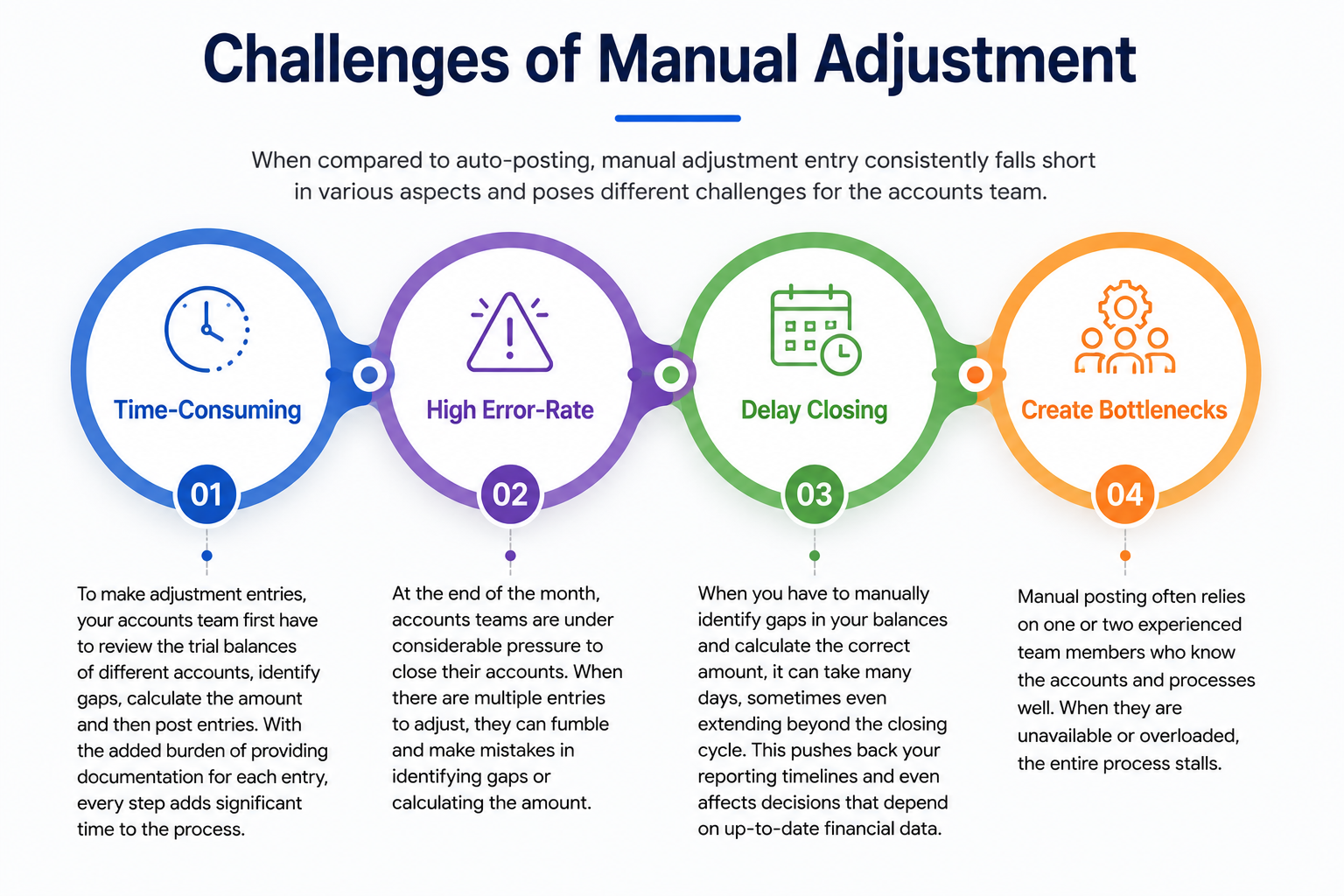
When compared to auto-posting, manual adjustment entry consistently falls short in various aspects and poses different challenges for the accounts team.
1. Time-Consuming
To make adjustment entries, your accounts team first have to review the trial balances of different accounts, identify gaps, calculate the amount and then post entries. With the added burden of providing documentation for each entry, every step adds significant time to the process.
2. High Error-Rate
At the end of the month, accounts teams are under considerable pressure to close their accounts. When there are multiple entries to adjust, they can fumble and make mistakes in identifying gaps or calculating the amount.
3. Delay Closing
When you have to manually identify gaps in your balances and calculate the correct amount, it can take many days, sometimes even extending beyond the closing cycle. This pushes back your reporting timelines and even affects decisions that depend on up-to-date financial data.
4. Create Bottlenecks
Manual posting often relies on one or two experienced team members who know the accounts and processes well. When they are unavailable or overloaded, the entire process stalls.
{{banner1}}
Manual vs Automated Adjustment Posting
The difference between manual and automated adjustment posting comes down to accuracy and speed.
With manual posting, every entry depends heavily on the accounts team making the right decision. Under the month-end close pressure, they always carry the risk of making errors. But an automated system follows pre-configured rules that consistently post correct entries in your ledgers.
Moreover, automated adjustment posting is considerably fast and consistent in identifying discrepancies, calculating adjustment amounts and posting entries, thus freeing up your accounts team to focus on strategic tasks.
Types of Entries That Can Auto-Post
There are many types of adjustment entries that can be auto-posted. The overall function of these adjustment entries is to adhere to IFRS and avoid overstating your revenue or expenses, thus keeping your income statements and account balances clean and accurate. The following are some of the common adjustment entries made by businesses.
1. Accrued Revenue
Accrued revenue refers to income that has been earned but not collected or billed in a reporting period. It is common in service-based businesses, long-term contracts, project work or industries like SaaS where performance obligations are met before billing. Interest earned on investments and rent earned but not collected are examples of accrued revenue.
2. Accrued Expense
Accrued expenses are the costs incurred by you in a reporting period but have not been paid or billed to you. Utilities, employee wages, interest earned on loans, etc., are common examples of accrued expenses.
3. Deferred Revenue
Deferred revenue refers to income you have already earned, but you have yet to deliver goods or services in exchange. Deferred revenue is recorded in a liability account. As you complete your performance obligations, an appropriate amount is moved from the balance sheet to revenue in the income statement.
4. Prepaid Expense
Prepaid expenses are payments your business has made but has not yet received any goods or services in exchange for them. Insurance premiums, rents or subscriptions to software, where you pay up front for 12 months but use the service across the year, are some examples of prepaid expenses.
How Auto-Posting Works
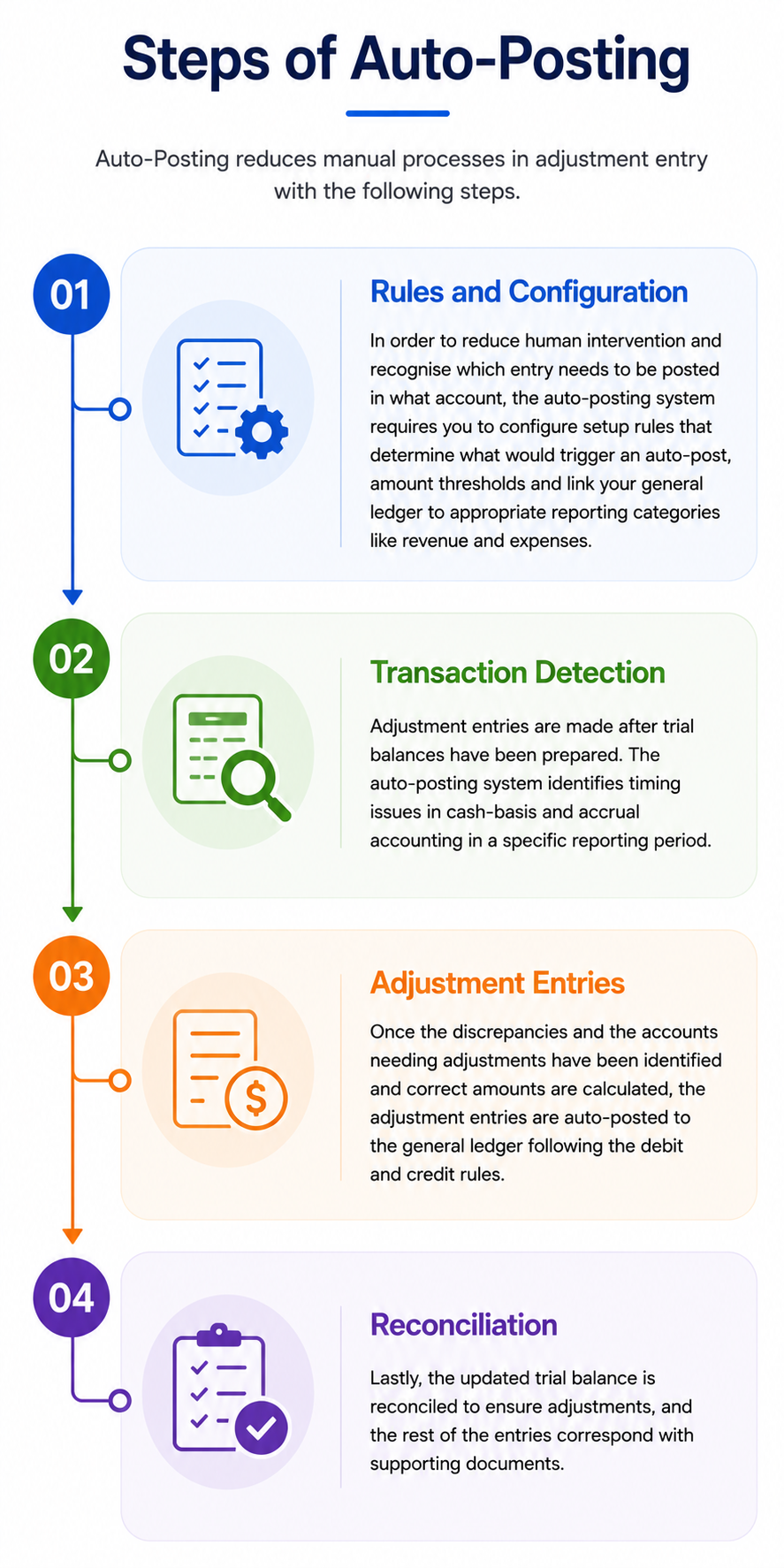
Auto-Posting reduces manual processes in adjustment entry with the following steps.
1. Rules and configuration
In order to reduce human intervention and recognise which entry needs to be posted in what account, the auto-posting system requires you to configure setup rules that determine what would trigger an auto-post, amount thresholds and link your general ledger to appropriate reporting categories like revenue and expenses.
2. Transaction Detection
Adjustment entries are made after trial balances have been prepared. The auto-posting system identifies timing issues in cash-basis and accrual accounting in a specific reporting period.
3. Adjustment entries
Once the discrepancies and the accounts needing adjustments have been identified and correct amounts are calculated, the adjustment entries are auto-posted to the general ledger following the debit and credit rules.
4. Reconciliation
Lastly, the updated trial balance is reconciled to ensure adjustments, and the rest of the entries correspond with supporting documents.
{{banner1.1}}
Risks and Considerations
While adjustment entry automation helps you save time in month-end closing, if you’re not careful in setting up the platform, you may encounter mistakes and inconsistencies in your data.
1. Incorrect GL Mapping
GL or general ledger, mapping is the process of connecting your accounts to reporting categories such as revenue, expenses, assets or liabilities. Incorrect mapping rules in adjustment entry automation will lead to errors in your financial reports.
2. Duplicate Posting
Although automation significantly reduces duplication risk, in some cases, a glitch in syncing or multiple members using the same system or transaction can cause double postings.
3. Unauthorised Adjustment
An adjustment entry automation system should not lack in providing you with oversight over the operations. They should be equipped with approval workflows and access control that ensure only authorised adjustments are posted, and there are audit trails for every transaction.
Finishing Off
Automation takes over repetitive and error-prone tasks of detecting and posting adjustment entries to your general ledger, thus keeping your financial records clean and allowing your accounts team to focus on issues that matter.
Osfin is a proven player when it comes to automating financial operations. It’s a low-code, file-agnostic platform with 170+ connectors. It is capable of handling one-to-many and many-to-one transactions and multi-way reconciliation, including 2-way, 3-way, 4-way and 5-way.
Moreover, its exception handling engine automatically flags anomalies in your data and routes them to appropriate personnel. And to keep the integrity and security of financial data, Osfin applied 256-bit encryption, maker-checker flow, role-based access and two-factor authentication.
If you want to streamline your financial operations and bring 100% accuracy to it, book a demo with Osfin now!
FAQs
1. What are 4 common types of adjustment entries?
The four types of adjustment entries are accrual expenses, accrual revenue, prepaid expenses and deferred revenue. All these adjustment entries can be automated with automation software like Osfin.
2. Are cash entries included in adjustment entries?
Adjustment entries are made to fix timing issues between cash basis and accrual accounting. A cash entry would be considered a journal entry and not an adjustment entry.
3. What risks need to be considered in adjustment entry automation?
An adjustment entry automation platform is only effective when you ensure accurate GL mapping and give access control to only the required personnel.
4. What challenges are solved by adjustment entry automation?
Adjustment entries are made at the end of the month when the accounts teams are already facing a time crunch. Manually processing them can result in delays and a high error rate. Automation adds speed and accuracy to the month-end closing by applying pre-configured rules to identify accrued revenue, accrued expenses, deferred revenue and prepaid expenses and posts these entries in the general ledger.