Automating Bank Charge Reconciliation
A business processes hundreds of transactions every month, and for each of them, its bank deducts a certain fee. This bank charge can be for monthly maintenance, ATM use or wire transfers. All these charges compiled together can make a significant sum of money, which must be accounted for in accurate financial reporting.
This is what bank charge reconciliation is meant for. But why make your accounts team go through each bank statement line by line when we have automation platforms that bring speed and accuracy to bank charge reconciliation?
In this article, we explore why automation matters for bank charge reconciliation, the challenges in manual processes, and automation platforms like Osfin, Autorek, Blackline, etc., that enhance it for you.
Key Notes
- There is no consistency with which banks charge fees for any transaction, making it difficult for account teams to check bank statements line by line, identify bank charges and reconcile them with internal records.
- Manual bank charge reconciliation is also prone to errors, is time-consuming, and lacks adequate security control.
- Platforms like Osfin are equipped with tools that can automatically extract fee data from bank statements, match it with corresponding entries in the general ledger, flag unmatched entries for review and create a full reconciliation report at the end of the process.
What Is Bank Charge Reconciliation and Why Automation Matters
To process any payment transaction, your bank deducts a fee from your account. Some of these are fixed, while others can vary based on transaction volume. Bank change reconciliation refers to the process of identifying every fee charged by them, matching it to the corresponding entry in your general ledger, and investigating any anomalies.
As there is no consistency with which bank charges are applied, it has often made it difficult for businesses to identify and reconcile them. There is always the risk of missing certain entries or recording incorrect amounts, which can affect your financial reports.
With automation tools like Osfin, bank charge reconciliation has become faster and error-free, helping you keep your financial data accurate, avoid revenue leakage and identify instances of overcharging.
Manual vs Automated Bank Charge Reconciliation
For your accounts to show you an accurate financial picture of your company, you have to reconcile your bank charges with your internal ledgers. However, whether you choose manual or automated bank charge reconciliation would make a big difference in your results.
Here's what the manual process typically looks like:
- Review the bank statement and locate every fee line item.
- Identify what each charge relates to.
- Search the general ledger for a matching entry.
- Compare the amounts and dates to confirm they align.
- Investigate any discrepancy that doesn't match.
- Manually record any missing entries.
Manual reconciliation may seem feasible at first, but when you're dealing with multiple bank accounts, multiple fee types, and a tight closing deadline, this process becomes a genuine bottleneck. It always carries a high risk of errors, such as recording the wrong amount or omitting entries, which can lead to discrepancies in your financial reports.
Now, here's how an automated process compares:
- The system extracts all fee data directly from the bank statement.
- It matches each charge to the corresponding general ledger entry automatically.
- Any unmatched items are flagged and highlighted for review.
- Matching entries are auto-posted without manual intervention.
- A full reconciliation report is generated at the end of the process.
Automated bank charge reconciliation reduces your accounts team's workload by taking over this task and reducing the reconciliation time from days to a few minutes. Osfin, for instance, comes with 170+ connectors that enable easier integration with banks and ERPs, supporting faster data capture and reconciliation, with 100% accuracy.
{{banner1}}
Challenges with Manual Bank Charge Reconciliation
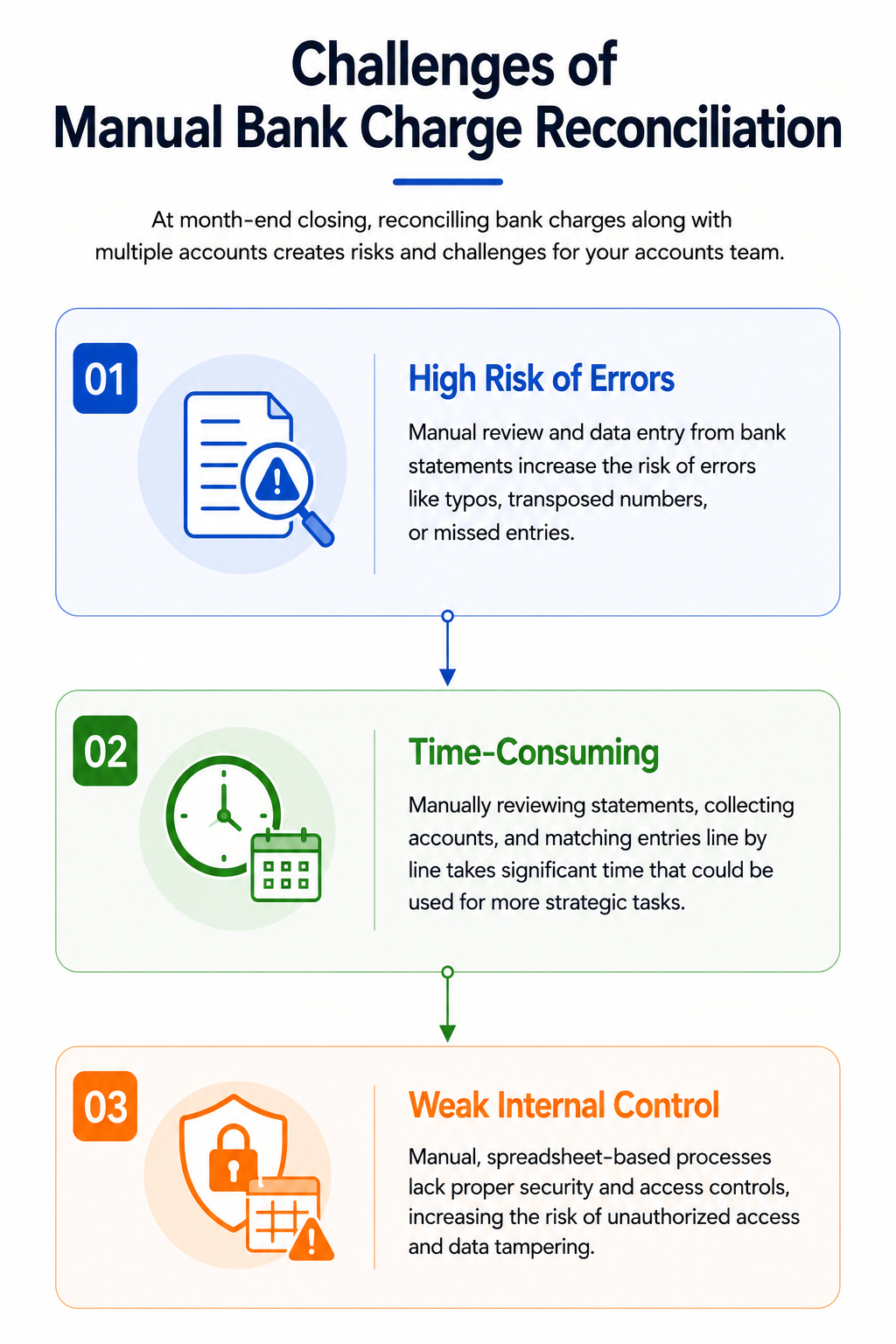
At the month-end closing, your accounts team is busy reconciling multiple accounts. When you have to reconcile bank charges along with these accounts, it ends up carrying multiple risks and challenges.
1. High Risk of Errors
When your accounts team has to manually review and enter data from bank statements and match it with the general ledger, there is always a high risk of making errors like typos, transposed numbers or omissions.
2. Time Consuming
Reviewing bank statements line by line, collecting relevant accounts and matching them while keeping an eye out for discrepancies ends up consuming significant time of your accounts team, which could otherwise have been used for high-value, strategic tasks.
3. Weak Internal Control
Your financial data, including bank statements, is sensitive information that must be secured properly. However, manual processes with spreadsheet-based workflows lack adequate security controls, enabling anyone to access and tamper with your data.
Types of Bank Charges
Banks apply a wide range of fees, and each has to be correctly captured and reconciled by your accounts team for accurate financial reporting. The following are some of the fees charged by banks.
1. Monthly Maintenance Fees: Recurring fee charged for maintaining a bank account and related services like online banking, branch location, and customer support.
2. Per-Transaction Fees: Charges paid each time an electronic transaction is made.
3. Wire Transfer Fees: Wire is a method of electronic fund transfer and is processed via SWIFT or Fedwire. Domestic wire transfer fee typically ranges between $10 and $30, while for international transfers, they can cross $50.
4. Overdraft Fees: An overdraft happens when banks allow you to continue making a payment when your account balance is insufficient. For each overdraft, the bank charges interest and a fee.
5. ATM Fees: After reaching a certain number of transactions, usually 3 to 5, banks charge you a fee for ATM withdrawals.
6. Check Printing Fees: Banks deduct fees whenever you order physical cheques.
7. NSF Fees: NSF or non-sufficient funds fees are charged when a payment is returned due to insufficient account balance.
Bank Charge Reconciliation Tools
There are several platforms that automate bank charge reconciliation for you and streamline the whole process. Here are some of the tools among them.
1. Osfin
Osfin is an intelligent automation that automates financial operations across deposits, loans, payments and more. It serves enterprises across banking, payments & cards, fintech or any business that deals with a high volume of transactions. It eliminates manual reconciliation, speeds up the whole cycle and provides real-time cash-flow visibility through intuitive dashboards.
Key Features
- File format agnostic platform, equipped with 170+ connectors enabling smooth data import from multiple sources, regardless of the platform. Applies custom deviation tolerances to filter out poor-quality data at the point of ingestion.
- Built to handle many-to-one and one-to-many transactions and perform logic-based, multi-way matching and reconciliation, including 2-way, 3-way, 4-way and even 5-way.
- Ticketing and exception handling engine automatically flags unmatched transactions, assigns them accurate reasons and routes them to the appropriate team members for review and correction.
- Helps you stay compliant by maintaining audit-ready workflows with complete traceability and transaction history.
- Ensures the security of your financial data with 256-bit encryption, role-based access, two-factor authentication and global compliance certifications like SOC 2, PCI DSS, ISO 27001, and GDPR.
{{banner1.1}}
2. Blackline
BlackLine is a financial operations platform trusted by many companies worldwide. It uses AI to automate record-to-report and invoice-to-cash processes, helping finance and accounting teams close faster, reduce errors, and maintain stronger control over their financial data.
Key Features
- Speeds up your financial close process by automating account reconciliation, journal entries and transaction matching.
- Equipped with Varity AI that detects anomalies and uncovers insights from your data.
- Provides audit trails across all financial operations from a single connected platform.
3. Trintech
Trintech is a cloud-based financial close software provider serving industries from banking and manufacturing to retail and healthcare. It uses AI to automate account reconciliations, transaction matching, journal entries, and close task management.
Key Features
- Reduces preparation time with AI-assisted matching across general ledger, subledgers and bank data.
- Easily integrates with multiple ERPs, including SAP, Oracle and NetSuite.
- Provides risk-based controls for your financial data.
4. Autorek
AutoRek is a financial data management and reconciliation platform built for large financial institutions, including banks, asset managers, and insurance firms. It automates the entire reconciliation process from data ingestion to reporting, helping clients cut operational costs.
Key Features
- Supports multiple options to deliver data to the platform, including SFTP, messaging and cloud storage.
- Performs high-speed matching with configurable rules and suggests match functionality.
- Automated creation of journal entries for rounding differences, tolerance write-offs, currency differences and sales tax.
5. ReconArt
ReconArt is a web-based enterprise reconciliation platform serving industries including banking, payments, travel, retail, and insurance. It covers the full reconciliation lifecycle, from data integration and transaction matching to balance sheet reconciliation, journal approvals, and variance analysis.
Key Features
- Uses rule-based automated matching with exception classification to reduce manual investigation and speed up resolution.
- Provides role-based workflows, task checklists, and journal approval processes for better team collaboration and financial close management.
- Works with any ERP or accounting system and offers flexible deployment.
How to Choose the Best Tool
Bringing automation to your bank charge reconciliation speeds up the process and increases its accuracy. However, you must consider the following factors when choosing the tool that would best suit your organisation.
1. A clean and easy-to-navigate user interface.
2. Supports multiple file formats and easily integrates with your ERPs and other systems.
3. Equipped with features like access control and encryption to protect your financial data.
4. Keep you compliance-ready with audit trails and transaction history.
5. Provides dedicated customer support when you run into technical issues or processing errors.
Cost Optimisation in Bank Charge Reconciliation
Organisations and teams that have till now relied on manual processes for reconciling different accounts may not be as comfortable with the idea of introducing automation to this routine. However, automation helps in optimising your costs related to month-end closing.
When you manually handle bank charge reconciliation, you have to employ a big accounts team, only for them to do repetitive, low-impact work, which increases your labour costs.
When deploying automation tools in your organisation, the platform reduces the reconciliation time from days to a few minutes. Osfin, for instance, can reconcile 30 million transactions in 15 minutes. This enables you to use your accounts team for more strategic and high-value work.
Wrapping Up
Bank charge reconciliation is a small process with a big impact on your financial accuracy. Doing it manually is slow, risky, and a poor use of your team's time. Automation changes that entirely with faster matching, fewer errors and hassle-free month-end closing.
With Osfin, you can streamline not just bank change reconciliation, but also other financial operations across payments, loans, trades, etc. It eliminates manual reconciliation, reduces revenue leakage and provides real-time cash flow visibility through intuitive dashboards and reporting.
{{banner2}}
FAQs
1. Is the bank charge reconciliation the same as the bank reconciliation?
No, bank charge reconciliation is different from bank reconciliation as it focuses on matching the fees charged by banks to the transaction data in the general ledger. Bank reconciliation, on the other hand, matches bank statements with the company’s cash records.
2. What is the benefit of bank charge reconciliation?
Bank charge reconciliation helps keep your financial data accurate, avoid revenue leakage and identify any instance of overcharge.
3. What are the types of fees charged by banks?
Some of the fees commonly charged by banks include maintenance, per-transaction, wire, ATM, overdraft and NSF fees.
4. What are the steps of automated bank charge reconciliation?
The process starts with an automation platform extracting data from bank statements and the general ledger, matching it and flagging any unmatched items for review by appropriate personnel. Matched entries are auto-posted in your system, and a full reconciliation report is generated at the end of the process.